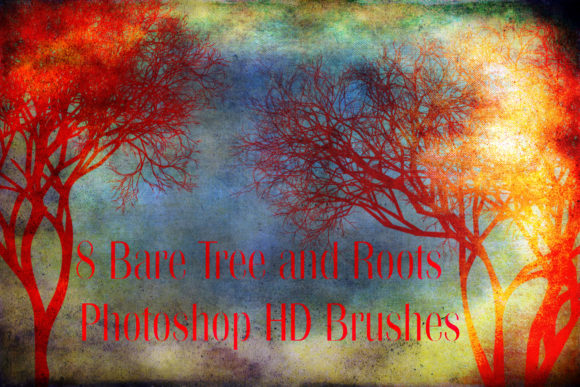
Enhancing Digital Landscapes with 8 Bare Tree - Photoshop HD Brushes
Creating convincing natural environments in digital art is often one of the most challenging tasks for illustrators, concept artists, and photo manipulators. While software tools have become increasingly sophisticated, the organic complexity of nature—specifically the intricate branching structures of trees—remains difficult to replicate manually without consuming hours of tedious work. This is where specialized resources like the 8 Bare Tree - Photoshop HD Brushes become invaluable assets in a designer’s toolkit. These high-definition brushes are not just stamps; they are precision tools designed to inject realism and atmospheric depth into your compositions with minimal effort.
The core appeal of this specific brush set lies in its focus on detail and versatility. Comprising eight distinct tree branches, these brushes capture the erratic, organic growth patterns found in deciduous trees during late autumn or winter. Because they are rendered in high definition, they retain crisp edges and fine textural nuances even when scaled or manipulated within large canvas sizes. For professionals working under tight deadlines, having access to pre-rendered, high-quality botanical elements can mean the difference between a flat, artificial background and a immersive, believable world.
Bridging the Gap Between Concept and Reality
In the realm of concept art for games and film, speed and accuracy are paramount. Artists often need to block out environments quickly to convey mood and scale to directors or clients. Painting every twig and offshoot by hand is rarely feasible during the initial phases of production. The 8 Bare Tree - Photoshop HD Brushes allow concept artists to rapidly establish the silhouette and density of a forest or a solitary landmark tree. By layering these brushes with varying opacity and flow settings, an artist can build up complex canopy structures that feel grounded and weighty.
Consider a scenario where you are designing a post-apocalyptic landscape. The environment needs to feel desolate yet beautiful. Using these bare branch brushes, you can create skeletal trees that pierce through fog or stand stark against a gray sky. The lack of leaves forces the viewer to focus on the structure and form of the tree, which can evoke feelings of isolation or resilience. Because the brushes are compatible with Photoshop CS3 and above, they integrate seamlessly into established workflows, regardless of whether you are using a legacy version or the latest Creative Cloud release.
Photo Manipulation and Composite Artistry
For photo manipulators, blending disparate elements into a cohesive image is the primary challenge. When combining a subject photographed in a studio with a background landscape, the transition zones often look unnatural. Adding foreground elements like tree branches can help frame the subject and create a sense of depth. The 8 Bare Tree - Photoshop HD Brushes are particularly effective here because their high resolution ensures they do not pixelate when placed close to the camera lens in a composite.
A common technique involves placing these brush strokes on separate layers and applying motion blur or Gaussian blur to simulate depth of field. This mimics the way a real camera lens focuses on a subject while blurring the foreground and background. Since the pack includes eight different branch variations, you can rotate and flip them to create unique configurations that do not look repetitive. This variety is crucial for avoiding the "stamped" look that plagues lower-quality brush sets. The ability to customize color, size, and angle allows the artist to match the lighting conditions of the source photographs perfectly, ensuring shadows and highlights align logically.
Graphic Design and Editorial Illustration
Beyond fine art and entertainment media, these brushes have practical applications in graphic design and editorial illustration. Minimalist designs often rely on strong, clean lines to convey messages. The stark elegance of bare tree branches fits well within modern aesthetic trends that favor negative space and organic shapes. Designers creating book covers, magazine layouts, or branding materials for eco-friendly products can use these brushes to add a touch of sophistication and natural beauty without cluttering the composition.
For example, a wedding invitation suite with a winter theme could utilize these delicate branch structures to frame text or create subtle borders. The high-definition nature of the .ABR file ensures that when the design is printed, the lines remain sharp and professional. Unlike raster images that may lose quality when resized, these brushes vector-like precision (within the limits of raster brushes) allows for scalability up to a certain point before detail loss occurs. Given the small file size of the ZIP archive (3.36 MB), downloading and installing the set is quick, making it an easy addition to a designer’s resource library for last-minute projects.
Technical Considerations and Best Practices
While the 8 Bare Tree - Photoshop HD Brushes are powerful, getting the best results requires understanding how to manipulate them within Photoshop. Simply clicking once on the canvas will rarely yield a natural look. Instead, treat each brush stroke as a building block. Start with a base layer for the main trunk or larger branches, then use smaller, lighter strokes to add secondary and tertiary branches. Varying the opacity is key; lower opacity allows you to build up density gradually, creating a more translucent and airy feel that mimics real light passing through twigs.
Color dynamics also play a significant role. Rarely is a tree branch a single flat color. Use the color overlay or hue/saturation adjustment layers to tint the branches to match your environment. In a sunset scene, you might warm up the highlights on the branches facing the light source while cooling down the shadows. Additionally, consider using layer masks to erase parts of the brush stroke where they intersect with other objects, ensuring proper occlusion and spatial relationships.
It is important to note the limitations. These are static brushes, meaning they do not generate procedural geometry. If you need a tree from a specific angle that is not represented in the eight provided variations, you may need to combine multiple strokes or use the liquify tool to adjust the shape slightly. However, for most standard perspectives and artistic interpretations, the provided variety is sufficient. The compatibility with Photoshop CS3 and above ensures broad accessibility, but users should ensure their tablet pressure sensitivity is calibrated correctly to take full advantage of any dynamic control settings available in their version of Photoshop.
Why Detail Matters in Digital Nature
The difference between a good digital painting and a great one often lies in the micro-details. Viewers may not consciously notice every twig, but their absence is felt. The human brain is wired to recognize patterns in nature, and when those patterns are too simple or repetitive, the image feels "off." The 8 Bare Tree - Photoshop HD Brushes address this by providing irregular, organic forms that break up uniformity. This attention to detail enhances the credibility of the artwork, allowing the viewer to suspend disbelief and immerse themselves in the scene.
Furthermore, using high-quality brushes respects the viewer’s experience. Pixelated or blurry elements distract from the narrative of the piece. By utilizing HD resources, artists demonstrate a commitment to quality that resonates with clients and audiences alike. Whether you are creating a moody horror game environment, a serene landscape print, or a chic editorial layout, the right tools elevate the final output. These eight brushes offer a focused, efficient solution to a common problem, freeing up creative energy for broader compositional decisions rather than getting bogged down in manual rendering.
Ultimately, the value of this toolset is measured by the time it saves and the quality it adds. For anyone looking to enhance their digital artworks with amazing natural details, integrating these bare tree branches into your workflow is a logical step. They serve as a reminder that technology, when used thoughtfully, can amplify artistic vision rather than replace it. If you find these brushes useful in your projects, considering rating them helps support the creators and guides other artists toward valuable resources.