Unlocking Creative Potential: A Guide to Procreate Mountain Stamps and Hand-Drawn Brush Sets
In the rapidly evolving world of digital art, efficiency and aesthetic quality often walk hand in hand. For artists, designers, and hobbyists using the iPad, Procreate has become the industry standard for illustration. However, starting from a blank canvas can be intimidating and time-consuming. This is where specialized tools like the Procreate Stamps Brushes Mountain and Hand-drawn Brush-set come into play. These resources are not just shortcuts; they are powerful assets that streamline the creative process while maintaining a unique, organic feel.
Understanding how to leverage these digital stamps and brushes can transform your workflow, whether you are designing social media graphics, creating intricate landscapes, or developing branding materials. This article explores the significance of these tools, their practical applications, and how they fit into the modern digital design ecosystem.
What Are Procreate Stamps and Why Do They Matter?
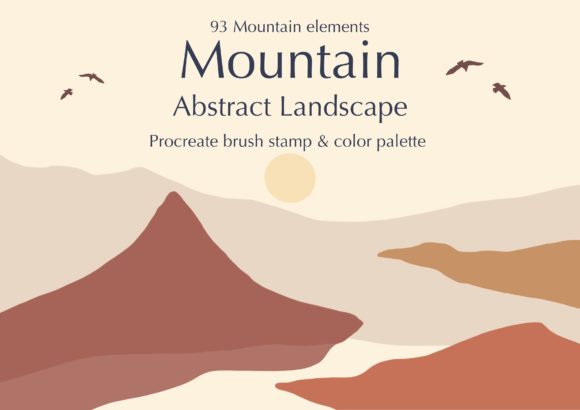
At their core, digital stamps are pre-designed elements that can be inserted into your artwork with a single tap. Unlike traditional brushes that require you to draw every line and shade manually, stamps allow you to place complex shapes—such as mountain ranges, trees, or abstract boho patterns—instantly. The 93 Mountain Landscape Procreate Stamps included in this specific set offer a diverse library of natural forms, ranging from jagged peaks to rolling hills.
The significance of these tools lies in their ability to bridge the gap between amateur sketching and professional-grade composition. For beginners, they provide a safety net, ensuring that perspective and proportion remain consistent. For experienced designers, they serve as time-savers, allowing them to focus on lighting, color theory, and narrative rather than spending hours drawing repetitive natural elements.
The Role of Hand-Drawn Aesthetics in Digital Design
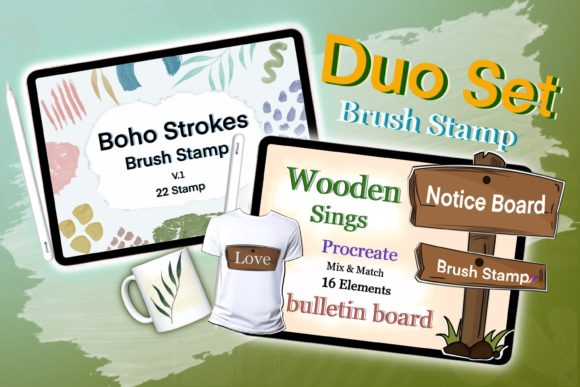
One might assume that digital tools result in sterile, perfect lines. However, the Hand-drawn Brush-set counters this misconception by introducing texture and imperfection. These brushes mimic the organic variability of pencil, charcoal, or ink on paper. When combined with mountain stamps, they allow artists to blend seamless vector-like shapes with textured, artistic details. This hybrid approach is crucial in modern design, where audiences crave authenticity and warmth over cold, computer-generated precision.
Technical Requirements and Compatibility
Before diving into the creative possibilities, it is essential to understand the technical framework required to use these assets effectively. Digital art tools are not universal; they are built for specific ecosystems.
Important: You need an iPad Pro, an Apple Pencil or a compatible, pressure-sensitive stylus, and the Procreate App to use these brushes. These brushes DO NOT work in Photoshop or any other application. This limitation is due to the proprietary file format (.brushset and .stamp) that Procreate uses to encode pressure sensitivity, tilt, and texture data.
Understanding this compatibility constraint helps avoid frustration. If you are a multi-platform artist who switches between desktop and tablet, you must plan your workflow accordingly. Use Procreate for the initial composition and texturing using these stamps, then export your layers to other software if further editing is required.
Practical Applications for Designers and Artists
The versatility of the 93 Mountain Landscape Procreate Stamps and the accompanying Boho 30 color palettes makes them suitable for a wide array of projects. Here is how different creators can integrate these tools into their daily work:
- Graphic Design and Branding: Boho aesthetics are highly popular in lifestyle branding, wedding invitations, and packaging. The mountain stamps can serve as central motifs for logos or background elements for business cards, evoking feelings of adventure and stability.
- Social Media Content: Influencers and content creators need visually appealing backgrounds for quotes and announcements. Using these stamps allows for the rapid creation of cohesive Instagram stories or Pinterest pins that stand out in a crowded feed.
- Illustration and Storytelling: Children’s book illustrators can use the hand-drawn brushes to add texture to characters while using the mountain stamps to quickly establish settings. This speeds up the storyboard phase significantly.
- Web and UI Design: While less common, organic shapes are trending in web design to break up rigid grid layouts. These stamps can be exported as PNGs with transparent backgrounds to add visual interest to landing pages.
Customization: Making the Stamps Your Own
A common misunderstanding is that using stamps limits creativity because everyone uses the same shapes. In reality, the power of Procreate lies in its customization options. You can change the color, size, and opacity of these stamps endlessly.
For example, a single mountain stamp can look like a distant, hazy peak when reduced in opacity and colored blue, or a stark, rocky foreground element when kept opaque and colored gray. By layering multiple stamps and adjusting their blending modes, you can create entirely unique landscapes that do not look "stamped." This flexibility ensures that your final output remains original and tailored to your specific vision.
Integrating the Boho Color Palettes
Color theory is often the most challenging aspect of design for beginners. The inclusion of 30 Boho color palettes addresses this pain point directly. Boho (bohemian) color schemes typically feature earthy tones, muted pastels, and warm neutrals. These palettes are curated to harmonize with the mountain stamps, ensuring that your compositions look professional from the start.
Instead of guessing which shade of terracotta matches a sage green mountain, you can select from pre-tested combinations. This not only speeds up the workflow but also educates the user on effective color pairing. Over time, analyzing these palettes can improve your intuitive understanding of color harmony, a skill that transfers to all areas of design.
Step-by-Step: Getting Started with Your New Tools
To help you begin your journey with this brush set, here is a logical workflow to follow:
- Installation: Download the files to your iPad. Tap on the .brushset file to automatically import it into Procreate. Ensure your app is updated to the latest version for full compatibility.
- Canvas Setup: Create a new canvas. Consider the final output size (e.g., 300 DPI for print, 72 DPI for web).
- Layer Management: Create separate layers for your background, mid-ground, and foreground. This non-destructive workflow allows you to move mountains around without affecting other elements.
- Stamping: Select the stamp brush. Tap on the canvas to place a mountain. Use the transform tool to resize and rotate it. Remember, variety in scale creates depth.
- Texturing: Switch to the hand-drawn brushes on a new layer. Add details like snow caps, rocks, or vegetation over the stamped shapes to blend them into the scene.
- Coloring: Apply the Boho palettes. Use the color drop feature or manual painting to apply the chosen hues. Adjust opacity to create atmospheric perspective.
Conclusion: Elevating Your Digital Artistry
The Procreate Stamps Brushes Mountain and Hand-drawn Brush-set represents more than just a collection of digital assets; it is a toolkit for efficient, high-quality creativity. By combining the speed of stamps with the organic feel of hand-drawn textures and curated color palettes, artists can produce compelling visuals with greater ease.
Whether you are a seasoned illustrator looking to speed up your workflow or a beginner eager to create professional-looking designs, these tools offer significant value. Remember, the key to mastering these resources lies in experimentation. Play with opacity, mix different stamps, and explore the boho palettes to find your unique style. With the right hardware—an iPad Pro and Apple Pencil—and the Procreate app, the only limit is your imagination.
Embrace the fusion of technology and tradition. Let these digital tools handle the heavy lifting of structure and form, freeing you to focus on the artistry and emotion that truly connect with your audience.