Integrating Summer Frames Procreate Brushes into Your Digital Art Workflow
Digital illustration has evolved from a niche hobby into a robust professional ecosystem. For creators operating on iPadOS, the ability to streamline repetitive design tasks is not just a convenience; it is a necessity for maintaining profitability and creative momentum. This is where specialized asset packs, such as Summer Frames Procreate Brushes, transition from simple add-ons to essential workflow components. These tools are designed to bridge the gap between raw artistic expression and polished, client-ready deliverables.
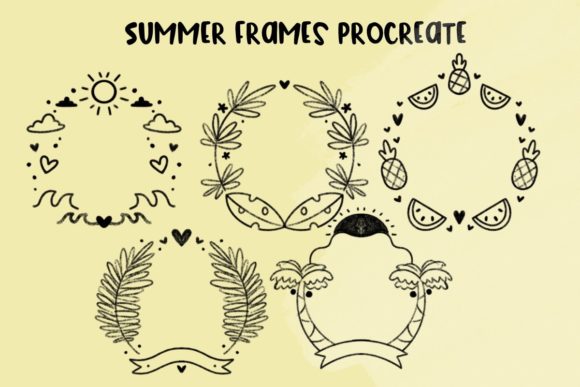
The collection features a curated array of cute and summer-related frames, incorporating iconic motifs like suns, palm trees, and pineapples. However, understanding the value of these assets requires looking beyond the aesthetic. It requires analyzing how they fit into the broader lifecycle of a digital project, from initial concept to final export. By integrating these brushes effectively, professionals can reduce production time while enhancing visual consistency across their portfolios.
Strategic Placement in the Creative Process
Many artists make the mistake of treating decorative elements as an afterthought, adding them only when a piece feels "empty." A more efficient approach involves planning for these elements during the initial sketching phase. When you know you have access to high-quality Summer Frames Procreate Brushes, you can compose your central subject with the frame’s dimensions and style in mind. This prevents the common issue of having to resize or reposition key illustrative elements to accommodate a border later in the process.
Consider the workflow of a social media manager or content creator. The goal is often rapid turnaround without sacrificing brand identity. By selecting a frame style early—perhaps a palm tree border for a tropical-themed campaign—you establish a visual boundary. This boundary helps guide the placement of text overlays and primary imagery. The brush acts as a structural guide, ensuring that the final composition remains balanced and focused. This pre-planning stage is crucial for maintaining efficiency, especially when producing batch content for platforms like Instagram or Pinterest.
Compatibility and Technical Requirements
Before integrating any new tool into your pipeline, verifying technical compatibility is essential. These brushes are distributed as .brushset files, a format native to Procreate. To access and utilize these assets, you must be running Procreate on a device supported by iOS or iPadOS. This specificity ensures that the brushes leverage the full capabilities of Apple Pencil pressure sensitivity and tilt recognition, which are critical for achieving natural-looking strokes and seamless integration with hand-drawn elements.
It is important to note that these files are not compatible with desktop-based software like Photoshop or Clip Studio Paint unless converted through third-party tools, which often results in loss of fidelity or dynamic properties. Therefore, this workflow is inherently tied to the mobile tablet environment. For professionals who switch between desktop and tablet, establishing a clear handoff protocol is necessary. You might complete the line art and framing on the iPad using these brushes, then export the layered PSD file for final color grading or typography work on a desktop workstation.
Enhancing Efficiency Through Asset Organization
The true power of a brush set lies not just in its artistic quality, but in how well it is organized within your digital workspace. A cluttered brush library can slow down decision-making and disrupt flow. Upon importing the Summer Frames Procreate Brushes, take the time to create a dedicated brush group. Label it clearly, perhaps "Seasonal Frames" or "Marketing Borders," depending on your primary use case. This organizational step reduces the cognitive load when you are in the middle of a creative session.
Furthermore, consider creating swatches or palettes that complement the specific colors found in the summer-themed elements. If the pineapple or sun motifs feature specific yellows and oranges, save these hex codes in your Procreate palette. This ensures that when you add complementary text or background elements, the color harmony is maintained automatically. This level of preparation transforms a simple brush pack into a cohesive design system, allowing for faster execution and higher consistency across multiple projects.
Practical Use Cases for Professionals and Entrepreneurs
The versatility of summer-themed frames extends far beyond personal art journals. For small business owners and entrepreneurs, these assets can significantly reduce the cost and time associated with graphic design. Here are several practical applications where these brushes add tangible value:
- Social Media Campaigns: Create consistent story templates for seasonal sales. The sun and palm tree frames provide an instant thematic cue, signaling summer promotions to followers without the need for complex graphic design.
- Digital Product Creation: Designers selling planners, stickers, or printable wall art can use these frames to create themed collections quickly. The cute aesthetic appeals to a broad demographic, making it suitable for stationery and lifestyle products.
- Educational Materials: Educators and tutors creating engaging summer reading lists or activity sheets can use these frames to make worksheets visually appealing. The playful nature of the pineapple and sun motifs helps maintain student interest.
- Client Presentations: Freelancers can use these frames to border mockups or presentation slides, adding a polished, professional touch that aligns with seasonal branding guidelines.
In each of these scenarios, the brush set serves as a force multiplier. It allows a single creator to produce output that might otherwise require a team of designers or extensive hours of manual illustration. The key is recognizing that the frame is not just decoration; it is a container for information and a tool for brand reinforcement.
Quality Control and Customization
While pre-made brushes offer speed, relying on them without customization can lead to generic-looking results. To maintain a unique voice, it is vital to adjust the brush settings to suit your specific style. Procreate allows users to modify size, opacity, and spacing. Experiment with these parameters to ensure the frames integrate seamlessly with your line weight. If your typical illustration style uses thin, delicate lines, a heavy, bold frame may look disjointed. Adjusting the brush size to match your existing stroke weight creates a cohesive visual language.
Additionally, consider layering techniques. Instead of using the frame as a flat, single-layer element, try breaking it down. Use the eraser tool to remove sections of the frame where they overlap with critical focal points. This technique creates depth and makes the frame feel like an organic part of the composition rather than a sticker placed on top. Such attention to detail distinguishes amateur work from professional-grade design.
Long-Term Value and Workflow Integration
Investing in high-quality digital assets like Summer Frames Procreate Brushes is a decision that pays dividends over time. Unlike physical supplies, digital brushes do not wear out, run out of ink, or degrade. Once imported and organized, they become a permanent part of your toolkit. This longevity supports long-term business goals by providing a reliable resource for recurring seasonal campaigns.
Moreover, these assets facilitate collaboration. If you work with other designers or outsource parts of your workflow, sharing a standardized set of brushes ensures that all contributors are working with the same visual vocabulary. This reduces the need for extensive revision rounds and ensures that the final product maintains a consistent look and feel, regardless of who touched the file.
Ultimately, the successful implementation of these brushes depends on your willingness to integrate them into a structured workflow. It is not enough to simply purchase and download; you must plan, organize, and adapt them to your specific needs. By doing so, you transform a simple collection of suns, palms, and pineapples into a powerful engine for creative productivity. Whether you are a blogger looking to spice up your header images, a marketer designing quick social posts, or an illustrator building a seasonal portfolio, these tools offer a practical path to higher efficiency and professional polish.
Remember that the software needed to access these brushes – Procreate on iOS and iPadOS – is just the platform. The real value comes from how you wield it. By focusing on process, compatibility, and strategic application, you ensure that every stroke contributes to a larger, more effective creative outcome. This mindset shift, from viewing brushes as mere tools to viewing them as workflow accelerators, is what separates casual users from serious professionals in the digital art space.