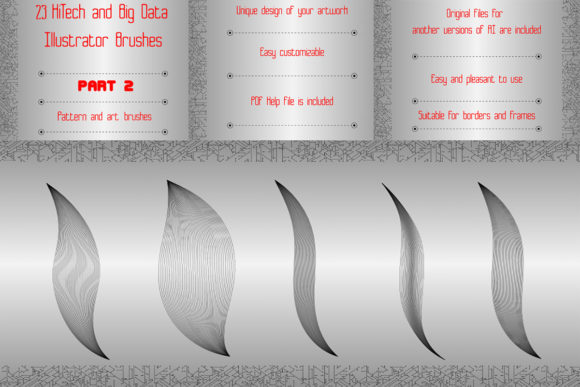
23 Big Data Brushes - Part 2: Elevating Tech Design with Vector Precision
In the fast-paced world of digital design, staying ahead of visual trends often means finding tools that bridge the gap between complex data visualization and aesthetic appeal. 23 Big Data Brushes - Part 2 emerges as a specialized resource for designers who need to infuse their projects with a distinct technological flair. This collection is not merely a set of decorative elements; it is a curated toolkit designed to streamline the creation of futuristic frames, borders, and intricate patterns that resonate with modern tech aesthetics.
For graphic designers, UI/UX professionals, and digital artists, the challenge often lies in creating custom vector assets that look professional without consuming hours of manual drawing time. This bundle addresses that pain point by offering a versatile array of brushes that can be manipulated to fit various design contexts. Whether you are working on a corporate whitepaper about blockchain technology or designing album art for an electronic music producer, these brushes provide the structural foundation needed to convey sophistication and innovation.
Bridging Aesthetics and Functionality in Tech Design
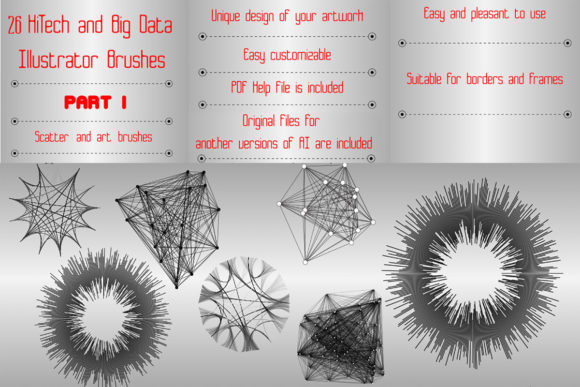
The core value of 23 Big Data Brushes - Part 2 lies in its dual nature: it functions both as a decorative tool and a structural element. The inclusion of 5 art vector brushes and 18 pattern vector brushes allows for a high degree of flexibility. Art brushes are particularly useful for creating organic yet technical lines, such as endless ribbons or flowing data streams, while pattern brushes excel at creating consistent borders and friezes that can wrap around any shape.
Consider the scenario of a startup preparing a pitch deck for investors in the fintech sector. The presentation needs to look cutting-edge but also trustworthy. Using standard clipart can often make a design feel generic or outdated. By applying the radio circuit elements or matrix-style brushes from this bundle, designers can create custom headers and footers that subtly reinforce the theme of connectivity and data processing. The ability to change the color, size, or thickness of these brushes means they can be adapted to match brand guidelines seamlessly, ensuring consistency across all slides.
Real-World Applications Across Industries
The versatility of these brushes extends far beyond traditional graphic design. Different industries have unique visual languages, and 23 Big Data Brushes - Part 2 offers elements that can be tailored to meet specific sector needs.
- Cybersecurity and IT Services: Companies in this field often struggle to visualize abstract concepts like encryption or network security. The gene card elements and big data visualization brushes can be combined to create metaphors for layered security protocols or complex data structures. These visuals help non-technical clients understand the magnitude and complexity of the services being offered.
- Event Branding and Music: For techno festivals, electronic music concerts, or sci-fi themed events, the futuristic mandalas and edging brushes are invaluable. They can be used to design stage backdrops, ticket layouts, or social media assets. The "techno pattern" aspect of the bundle allows for the creation of hypnotic, repetitive visuals that align perfectly with the rhythmic nature of electronic music.
- Educational Materials: Textbooks and online courses dealing with computer science or engineering can benefit from the diagram and scale brushes. Instead of relying on dry, static images, educators can use these vectors to create engaging chapter headers or section dividers that keep students visually engaged while reinforcing the subject matter.
Customization and Creative Freedom
One of the most significant advantages of using Adobe Illustrator brushes is the level of control they offer. Unlike raster images, which lose quality when scaled, the vector nature of 23 Big Data Brushes - Part 2 ensures crisp edges at any size. This is crucial for designers who need to apply the same asset to both a business card and a large-format banner.
The bundle includes original AI Illustrator 10 and EPS 10 files, ensuring compatibility with a wide range of software versions, from Illustrator CS5 to the latest releases. This backward compatibility is a thoughtful inclusion, acknowledging that many professional studios still operate on established workflows rather than always upgrading to the newest software immediately.
Designers are encouraged to experiment by combining several brushes. For instance, layering a wave brush with a matrix element can create a sense of depth and motion, simulating the flow of information through a network. The PDF help file with screenshots included in the ZIP archive serves as a quick start guide, helping users understand how to load and apply these brushes effectively. However, the true potential is unlocked when users begin to modify the brush profiles themselves. Since the original files are provided, advanced users can tweak anchor points or stroke profiles to create entirely new variations, making the toolkit infinitely expandable.
Technical Considerations and Workflow Integration
Before integrating 23 Big Data Brushes - Part 2 into your workflow, it is important to consider the technical specifications. The ZIP archive is compact at 1.6 MB, making it easy to download and store without cluttering your hard drive. However, because these are vector-based, the complexity of the paths can impact performance if overused in a single document. It is advisable to use these brushes for key design elements—such as borders, headers, and focal points—rather than filling entire backgrounds with high-density patterns, which could slow down rendering times.
Another consideration is color management. While the brushes come with default settings, their true power is realized when customized. Designers should plan their color palettes in advance. The technological style often benefits from high-contrast combinations, such as neon greens on dark backgrounds or sleek silvers on deep blues. Understanding how to adjust stroke colors and opacity within Illustrator will allow you to achieve the desired futuristic glow or subtle integration.
Strengths and Limitations
The primary strength of this bundle is its specificity. It targets a niche aesthetic—technological and data-driven design—with precision. The inclusion of diverse elements like waves, diagrams, and circuit boards provides a comprehensive vocabulary for tech-themed projects. Furthermore, the ease of customization means that the assets do not look "off-the-shelf," allowing for unique branding opportunities.
However, there are limitations to keep in mind. The style is distinctly futuristic and technical, which may not suit projects requiring a warm, organic, or minimalist aesthetic. Additionally, while the brushes are compatible with Illustrator CS5 and above, users of other vector software may need to convert the EPS files, which could result in the loss of some dynamic brush features. Therefore, this tool is best suited for Adobe Illustrator users who are comfortable working within that ecosystem.
Enhancing Visual Communication
Ultimately, 23 Big Data Brushes - Part 2 is about enhancing visual communication. In an era where data is ubiquitous, the ability to present it in an engaging, visually appealing manner is a valuable skill. These brushes provide the scaffolding for that presentation. They allow designers to move beyond basic shapes and lines, offering a rich library of pre-designed elements that can be mixed, matched, and modified to tell a story.
Whether you are decorating a frame for a tech blog post, creating a border for a digital certificate, or designing a complex infographic, these brushes offer a shortcut to professional results. They reduce the time spent on repetitive drawing tasks, freeing up creative energy for higher-level design decisions. By leveraging the flexibility of vector art and the specific thematic elements provided, designers can create work that is not only functional but also visually striking and relevant to the modern digital landscape.
For those looking to expand their design toolkit with resources that are both practical and stylish, this bundle represents a solid investment. It encourages experimentation and rewards creativity, allowing users to push the boundaries of what standard vector brushes can achieve. As with any design resource, the key is to use it thoughtfully, integrating the elements in ways that support the overall message and aesthetic of the project.