Transforming Digital Design with 26 Big Data Brushes Part 1
In the rapidly evolving landscape of digital graphic design, the demand for assets that convey complexity, connectivity, and modernity is higher than ever. Designers are constantly seeking tools that bridge the gap between abstract data concepts and visually stunning aesthetics. This is where 26 Big Data Brushes Part 1 emerges as a pivotal resource for creative professionals. These brushes are not merely decorative elements; they are sophisticated vector tools designed to inject a technological soul into your Adobe Illustrator projects. Whether you are crafting user interfaces, designing futuristic posters, or creating intricate border systems, this collection offers a versatile toolkit that adapts seamlessly to your workflow.
The Intersection of Techno Art and Functional Design
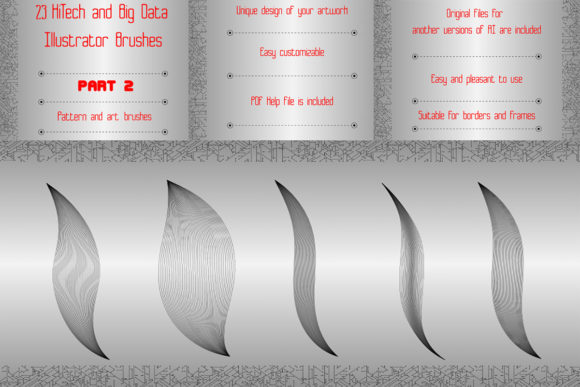
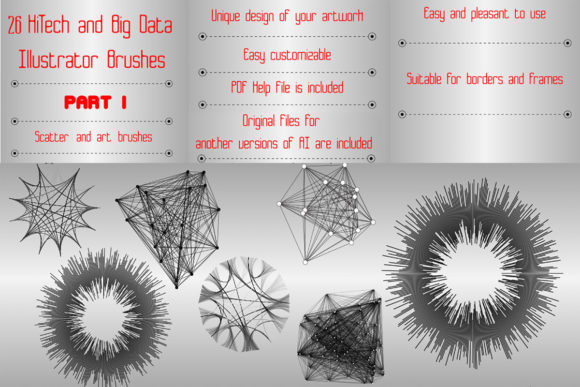
Techno art has moved beyond niche subcultures to become a dominant visual language in corporate branding, tech startups, and media production. The aesthetic relies heavily on precision, geometric patterns, and the visualization of invisible networks. 26 Big Data Brushes Part 1 captures this essence perfectly by providing scatter vector brushes that mimic the look of big data visualization elements. These include clusters, radial diagrams, matrices, and radio circuits. By utilizing these pre-built vectors, designers can bypass hours of manual path drawing and focus instead on composition and narrative.
The primary advantage of using scatter brushes for decoration lies in their organic randomness within a structured framework. When you apply a brush stroke, the individual elements—such as nodes, connecting lines, or circuit fragments—are distributed along the path with varying degrees of rotation and spacing. This creates a natural, dynamic look that static clip art simply cannot achieve. It allows for the creation of futuristic mandalas and frames that feel alive, as if data is actively flowing through the design.
Versatility in Frames, Borders, and Edging
One of the most practical applications of this brush set is the decoration of frames and borders. In technological style designs, standard rectangular borders often feel too rigid and outdated. Instead, designers require edging that suggests connectivity and depth. With 26 Big Data Brushes Part 1, you can easily generate endless ribbons, friezes, and complex edging that wraps around your content.
Consider a scenario where you are designing a brochure for a cybersecurity firm. A simple black line border fails to communicate the sophistication of the service. However, by applying a scatter brush composed of matrix elements and radio circuits, you create a border that visually reinforces the theme of digital protection and network monitoring. The ability to change the color, size, or thickness of these brushes means you can tailor the intensity of the effect. A subtle, thin grey line might work for a background element, while a bold, neon-colored stroke can serve as a primary focal point.
Customization and Creative Freedom
A common concern among designers when adopting new brush sets is the lack of flexibility. Fortunately, the brushes included in this bundle are fully editable vector paths. This means you are not locked into the default appearance. If a specific cluster looks too dense, you can expand the appearance and adjust the individual anchor points. If a radial diagram needs to be larger to fit a specific layout, you can scale it without any loss of quality, thanks to the EPS 10 and AI Illustrator 10 original files included in the package.
The true power of this toolset is revealed when you begin combining several brushes. By layering a wave brush with a cluster brush, you can achieve amazing results that look like complex data streams. You might use a wide, low-opacity brush for a background texture and overlay a sharp, high-contrast circuit brush for foreground details. This layering technique adds depth and dimensionality to flat designs, making them pop on screen and in print.
- Waves: Ideal for creating fluid motion backgrounds or representing data flow.
- Clusters: Perfect for simulating network nodes or particle effects.
- Radial Diagrams: Excellent for center-focused compositions and futuristic mandalas.
- Matrices: Adds a structured, grid-like technological feel to any surface.
- Radio Circuits: Provides intricate detail for close-up views or technical illustrations.
Technical Compatibility and Workflow Integration
For professional designers, compatibility is non-negotiable. You need assets that integrate smoothly into existing pipelines without requiring software upgrades or complex conversions. 26 Big Data Brushes Part 1 is designed with this reality in mind. The bundle is compatible with Illustrator CS5 and above, ensuring that even those working with slightly older but stable versions of the software can utilize these resources effectively.
The inclusion of a PDF help file with screenshots is a thoughtful addition that reduces the learning curve. While many experienced users may intuitively understand how to load and apply brushes, having visual guidance ensures that everyone can maximize the potential of the tool. Furthermore, the fact that you can make any brush for yourself in your Illustrator version empowers users to expand upon the initial set. You can take a single element from the scatter brush, modify it, and save it as a new custom brush, effectively infiniteizing the utility of the purchase.
The file size is also optimized for efficiency. At just 13.9 MB in a ZIP archive, the download is quick and does not clog up your hard drive with unnecessary bloat. This lightweight nature makes it easy to share with team members or store in cloud-based asset libraries for quick access during tight deadlines.
Enhancing Modern Visual Narratives
In today’s digital-first world, visual narratives often revolve around themes of innovation, connectivity, and intelligence. Whether you are working on a presentation for a fintech startup, a website header for an AI research lab, or social media graphics for a tech conference, the visual language must align with the subject matter. 26 Big Data Brushes Part 1 provides the semantic visual cues that audiences associate with these industries.
Using these brushes helps establish credibility. A design that incorporates accurate-looking radio circuits and data matrices signals attention to detail and technical proficiency. It moves the design away from generic stock imagery and towards a bespoke, tailored aesthetic. This is particularly important in competitive markets where brand differentiation is key. By using unique combinations of these brushes, you ensure that your visuals are distinct and memorable.
Moreover, the scalability of vector graphics means these brushes are future-proof. Whether your design needs to be displayed on a small mobile screen or blown up for a large-format trade show banner, the crisp edges and clean lines of the EPS 10 files ensure professional quality at any resolution. This versatility saves time and money, eliminating the need to recreate assets for different output formats.
Practical Tips for Best Results
To get the most out of 26 Big Data Brushes Part 1, consider starting with a monochromatic palette. Using shades of a single color, such as blue or cyan, can create a cohesive and professional look that mimics standard data visualization dashboards. Once you are comfortable with the forms, introduce contrasting colors to highlight specific elements, such as using bright orange for key nodes in a cluster brush.
Experiment with opacity settings. Lowering the opacity of background brushes can create a sense of depth, making foreground elements stand out more sharply. Additionally, do not hesitate to rotate and flip individual components after expanding the brush strokes. This breaks the repetitive pattern that can sometimes occur with scatter brushes, resulting in a more organic and less "generated" appearance.
Ultimately, the value of this bundle lies in its ability to accelerate the creative process while maintaining high artistic standards. It removes the technical barrier of drawing complex technological elements from scratch, allowing designers to focus on storytelling and composition. For anyone looking to elevate their techno-art projects, 26 Big Data Brushes Part 1 is an essential addition to the digital toolkit. If you find these tools enhance your workflow, please rate the product to help other designers discover its potential. Thank you for exploring the possibilities of modern vector design.