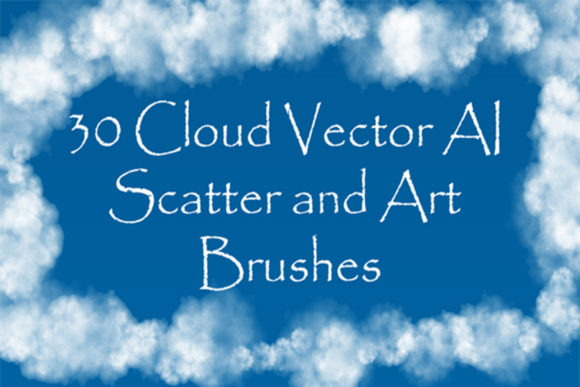
30 Cloud Illustrator Brushes: Transforming Digital Atmospheres with Ease
Creating realistic atmospheric effects in vector graphics has always been a bit of a paradox. We love vectors for their crisp, scalable lines, but nature is messy, organic, and rarely defined by perfect geometric paths. This is where 30 Cloud Illustrator Brushes step in to bridge the gap between rigid precision and fluid artistry. Whether you are designing a moody landscape, adding ethereal steam to a coffee cup illustration, or crafting a dynamic smoke effect for a poster, these tools offer a shortcut that doesn’t sacrifice quality.
The collection is designed to solve a specific problem: the time-consuming process of manually drawing complex, semi-transparent textures like fog, mist, and vapor. Instead of wrestling with gradient meshes or opacity masks for hours, you can apply these brushes to generate endless variations of clouds, haze, and overcast skies with a single stroke. It is not just about speed; it is about achieving a natural look that feels hand-painted while retaining the flexibility of editable vector paths.
Beyond Simple Skyboxes: Real-World Applications
While the name suggests these are strictly for sky elements, the versatility of this brush set extends far beyond drawing cumulus clouds on a horizon line. The inclusion of both scatter and art brushes allows for a wide range of decorative and functional uses across different industries.
Graphic Design and Branding
In branding, softness is often used to convey approachability, calm, or luxury. A tech startup might use subtle vapor trails to suggest speed and innovation without the harshness of solid lines. A wellness brand could utilize gentle mist effects to evoke tranquility. With 30 Cloud Illustrator Brushes, designers can create custom friezes or edging for packaging designs. Imagine a tea box where the steam rising from the cup isn't a static image but a customizable vector element that can change color to match seasonal limited editions. The ability to adjust the size, thickness, and color means one asset can serve multiple campaigns.
Digital Illustration and Concept Art
For illustrators working in Adobe Illustrator, adding depth is crucial. Flat designs can feel sterile without atmospheric perspective. These brushes allow artists to layer fog in the foreground to obscure details, creating a sense of mystery and depth. The seven art vector brushes are particularly useful here, as they maintain consistent shapes along a path, perfect for drawing long, winding smoke ribbons or dense cloud banks. The twenty-three scatter brushes, on the other hand, distribute individual cloud puffs randomly, mimicking the chaotic nature of real-world steam or distant haze. This distinction allows for a more nuanced approach to scene-building.
Web and UI Design Elements
Although vectors are primarily print-focused, SVGs are increasingly vital in web design. Lightweight, scalable cloud elements can be used as background textures for hero sections or as decorative dividers between content blocks. Because these brushes generate vector paths, they remain sharp on any screen resolution, from mobile phones to 4K monitors. Designers can export these elements as SVGs, ensuring fast load times compared to heavy raster images of clouds or smoke.
Understanding the Toolset: Scatter vs. Art Brushes
To get the most out of this collection, it helps to understand the mechanical difference between the two types of brushes included. The pack contains 23 scatter vector brushes and 7 art vector brushes. Each serves a distinct purpose in your workflow.
Scatter brushes are ideal for creating volume and texture. When you drag a scatter brush across your canvas, Illustrator places instances of the cloud shape along the path. You can control the spacing, rotation, and size variation. This is perfect for creating "swarms" of small clouds, dense fog patches, or the bubbly texture of boiling steam. It feels organic because no two strokes look exactly the same.
Art brushes stretch a single shape along the length of a path. These are your go-to tools for continuous forms like smoke ribbons, contrails from airplanes, or the sleek edge of a storm front. They provide a smoother, more controlled line, which is essential when you need directionality in your atmospheric effects. By combining both types, you can build complex scenes where structured smoke flows into diffuse mist.
Technical Considerations and Compatibility
Before diving in, there are practical constraints to keep in mind. The package is compatible with Illustrator CS5 and later versions, making it accessible to users who may not have the latest subscription updates. The archive includes original AI (Illustrator 10) and EPS 10 files, ensuring broad compatibility with older workflows or other vector software that supports EPS imports.
One critical detail noted in the documentation is that these brushes work best on any background color except white. This is a common characteristic of light-based effects like steam, mist, and highlights. Since these elements are essentially lighter than their surroundings, they need a mid-tone or dark background to be visible. If you are working on a white canvas, you will need to place a colored rectangle behind your artwork or adjust the blending modes of the brush strokes to ensure they pop. This is a small adjustment but vital for achieving the desired visual impact.
The file size of the ZIP archive is 33.4 MB, which is reasonable for a high-quality vector asset pack. It includes a PDF help file with screenshots, which is invaluable for beginners who might not know how to install or customize brushes in Illustrator. However, experienced users will appreciate that the brushes are fully editable. You are not locked into the default settings. You can double-click any brush in the library to modify its profile, change the colorization method, or adjust the scattering parameters to create your own unique variations.
Customization and Creative Freedom
The true power of 30 Cloud Illustrator Brushes lies in their adaptability. Because they are vector-based, you are not stuck with a predefined gray or white color. You can recolor them instantly to match your project’s palette. Want purple alien fog? Green toxic gas? Golden divine light? It is as simple as changing the stroke color. This flexibility makes the pack suitable for fantasy illustrations, sci-fi concepts, and surreal art projects where realism takes a backseat to style.
Furthermore, the ability to change the size and thickness means you can use the same brush for macro and micro details. Scale it up for a massive storm cloud dominating a poster, or scale it down for delicate condensation on a glass surface. This scalability ensures that you do not need separate assets for different zoom levels, streamlining your asset management.
Making the Right Choice for Your Workflow
When considering whether this toolset fits your needs, think about the frequency with which you incorporate atmospheric elements into your work. If you occasionally draw a sun, a manual approach might suffice. But if you regularly create environments, product mockups involving heat or cold, or dynamic compositions requiring motion blur effects via smoke trails, this pack pays for itself in saved time.
It is also worth noting that while these brushes automate the creation of complex shapes, they do not replace an understanding of light and shadow. To make the clouds look convincing, you still need to consider where the light source is coming from and how the mist interacts with other objects in the scene. The brushes provide the texture, but your artistic judgment provides the realism.
Ultimately, 30 Cloud Illustrator Brushes offer a robust solution for designers looking to add depth, mood, and movement to their vector artwork. By leveraging the strengths of both scatter and art brushes, and keeping technical limitations like background contrast in mind, you can elevate your designs from flat graphics to immersive visual experiences. Whether you are a seasoned illustrator or a graphic designer exploring new textures, this toolkit provides the foundational elements needed to master the art of digital atmosphere.