Cute MiniSet Doodle Brushes for Procreate
Digital illustration has evolved from a niche hobby into a robust professional industry, yet the desire for whimsical, hand-drawn charm remains universal. For iPad users working within the Procreate ecosystem, finding the right tools can significantly impact workflow efficiency and creative output. The Procreate Doodle Cute MiniSet Brushes offers a specialized solution for artists seeking to infuse their projects with playful, architectural elements. This digital asset pack is not merely a collection of stamps; it is a toolkit designed to streamline the creation of fairytale villages, castle scenes, and cozy home illustrations.
Understanding the value of this specific brush set requires looking beyond the surface level of "cute graphics." It is about how different creators—from seasoned professionals to enthusiastic beginners—can leverage pre-made assets to save time, maintain consistency, and enhance the narrative quality of their work. Because this is a digital file with no physical component, the purchasing decision relies heavily on understanding compatibility, usage rights, and the specific artistic needs of the buyer.
What Is Included in the Set?
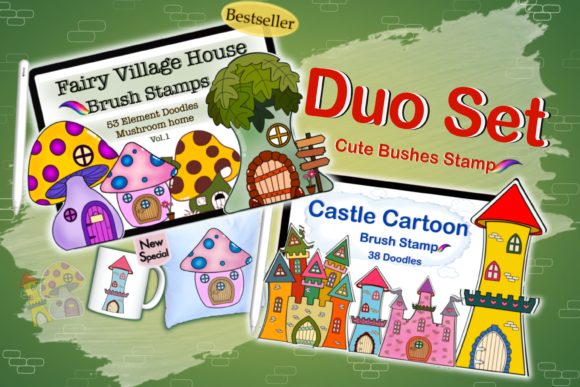
Before diving into use cases, it is essential to clarify exactly what constitutes this product. The Procreate Doodle Cute MiniSet Brushes is an instant digital download containing two ZIP files. Inside, users will find a comprehensive collection of 53 doodle elements. Specifically, the core of the package is a set of 38 doodle stamp brushes. These are not standard painting brushes that rely on pressure sensitivity for stroke variation; rather, they are stamp-style tools that place predefined shapes onto the canvas with a single tap or drag.
The thematic focus is on "Fairly Village House and Castle Doodle" designs. This means the assets include various architectural components such as turrets, rooftops, windows, doors, and decorative foliage that can be mixed and matched. The transparency of these stamps is a critical technical feature. Because the backgrounds are transparent, artists can layer textures, change colors, and add patterns without worrying about opaque white boxes obscuring their underlying artwork. Additionally, the download includes an instruction guide for installation and a ReadMe file, ensuring that even those new to importing brushes can get started quickly.
Why Different Creators Value This Tool
The appeal of this brush set varies significantly depending on the user’s experience level and professional goals. What serves as a time-saving shortcut for a freelancer might serve as a learning aid for a student.
For Beginners and Hobbyists
For those just starting their digital art journey, the intimidation factor of drawing complex perspective structures like castles or detailed houses can be high. The Procreate Doodle Cute MiniSet Brushes lowers this barrier. Beginners can use these stamps to create complete scenes without needing advanced knowledge of architectural drawing or perspective grids. This allows them to focus on composition, color theory, and storytelling rather than getting bogged down in technical line work. It provides immediate gratification and helps build confidence, as users can produce polished-looking illustrations early in their learning curve.
For Professional Illustrators and Freelancers
Experienced artists often face tight deadlines. A professional illustrator working on a children’s book or a series of greeting cards may need to produce multiple variations of a village scene. Drawing every brick and shingle from scratch for each iteration is inefficient. By using this brush set, professionals can rapidly block out structures and then customize them with their unique linework and shading styles. The value here is speed and scalability. The ability to mix and match elements allows for the creation of diverse environments while maintaining a cohesive artistic style across a project.
For Small Business Owners and Entrepreneurs
Entrepreneurs who run print-on-demand shops, sell digital planners, or create marketing materials often lack the time to commission custom artwork for every product. This brush set offers a cost-effective way to generate original-looking designs for invitations, social media posts, and packaging. Since the stamps have transparent backgrounds, business owners can easily integrate these doodles into existing brand templates. However, it is crucial for this group to verify licensing terms and ensure that the final output is sufficiently transformed to meet platform guidelines for original content.
For Educators and Content Creators
Teachers creating engaging worksheets or bloggers designing headers can benefit from the whimsical nature of these doodles. The "cute" aesthetic appeals strongly to younger audiences, making educational materials more inviting. For bloggers, these elements can break up text-heavy posts or add visual interest to tutorial thumbnails. The ease of use means that educators do not need to be expert artists to create visually appealing resources for their students or followers.
Technical Considerations and Compatibility
A common point of confusion for digital buyers is software compatibility. It is vital to note that the Procreate Doodle Cute MiniSet Brushes are designed exclusively for the Procreate app on iPad. They will not function in Adobe Photoshop, Clip Studio Paint, or any other desktop-based illustration software. This limitation is due to the proprietary file format used by Procreate for brush sets.
Furthermore, users must have the capability to unzip files. The download comes in ZIP format, which requires a file management app on the iPad or a computer to extract the contents before importing them into Procreate. While most modern devices handle this seamlessly, users unfamiliar with file management may need to consult the included instructions. This technical step is a one-time hurdle, but it is a necessary part of the digital purchase process.
Evaluating the Purchase: Key Priorities
When deciding whether this set matches your needs, consider the following factors:
- Creativity vs. Convenience: If you prefer drawing every element from scratch to ensure total uniqueness, this set may feel restrictive. However, if you view these stamps as a base layer to be customized, they offer immense creative flexibility.
- Cost Efficiency: Compared to hiring a designer or spending hours drawing complex structures, this digital download offers a high return on investment for frequent users.
- Quality and Resolution: As digital stamps, the quality depends on the resolution at which you use them. Procreate’s vector-like handling of stamps ensures they remain crisp, but users should always test scale limits.
- No Refund Policy: Due to the nature of digital goods, there are no refunds or exchanges once the files are downloaded. This policy is standard in the digital asset industry to protect intellectual property. Therefore, verifying that you have the correct software (Procreate on iPad) and understanding the file type is crucial before purchasing.
Practical Applications and Project Ideas
To visualize how this tool fits into a workflow, consider these practical examples:
- Greeting Cards: Create a birthday card featuring a whimsical castle. Use the stamp brushes to lay out the structure, then add hand-lettered greetings and watercolor textures for a personalized touch.
- Digital Planners: Design weekly spreads with tiny village houses marking important dates. The small scale of the doodles makes them perfect for functional yet decorative planner stickers.
- Children’s Book Illustrations: Build a recurring background setting for a story. By mixing and matching the house and castle elements, you can create a consistent world that appears throughout the book without repetitive manual drawing.
- Social Media Graphics: Enhance Instagram stories or Pinterest pins with border elements made from the doodle stamps. The transparent backgrounds allow these to overlay photos or colored backgrounds seamlessly.
Making the Right Decision
The Procreate Doodle Cute MiniSet Brushes is a specialized tool that excels in specific niches. It is ideal for creators who value efficiency, enjoy a whimsical aesthetic, and work primarily within the Procreate environment. It is less suitable for those seeking realistic architectural tools or those who work exclusively in desktop-based software.
By understanding the included materials, the technical requirements, and the potential applications, buyers can make an informed decision. Whether you are a beginner looking to simplify your workflow or a professional aiming to speed up production, this set offers a versatile foundation for digital creativity. Remember to review the ReadMe file upon download to ensure a smooth installation process, and embrace the freedom to mix, match, and customize these elements to suit your unique artistic vision.