Evaluating Circular Abstraction Brushes .ABR. for Digital Design
In the evolving landscape of digital art and graphic design, texture and shape libraries play a pivotal role in streamlining workflow and enhancing visual appeal. Among the myriad of tools available, Circular Abstraction Brushes .ABR. have emerged as a specialized resource for creators seeking geometric yet organic elements. This article provides an objective evaluation of these brush sets, exploring their utility, compatibility, and suitability for various design projects. By understanding the specific characteristics of circular abstraction brushes, designers can make informed decisions about whether this tool aligns with their creative objectives.
Understanding Circular Abstraction Brushes
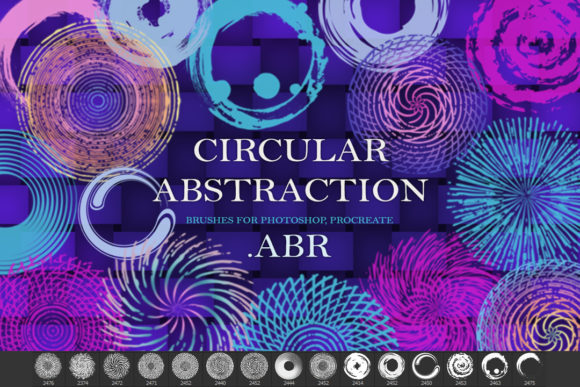
Circular abstraction brushes are digital stamp or shape tools designed to generate circular patterns with varying degrees of complexity, opacity, and texture. Unlike standard round brushes that simply paint a solid line, abstraction brushes introduce irregularities, splatters, gradients, or layered geometric forms within a circular boundary. The term "abstraction" implies that these shapes are not perfect mathematical circles but rather artistic interpretations that can mimic watercolor blooms, ink splatters, sunbursts, or modern minimalist rings.
The file format .ABR is the native brush preset format for Adobe Photoshop. However, the versatility of these assets often extends beyond Photoshop. Many modern design applications, including Procreate on iPad, support the import of .ABR files or offer comparable functionality through PNG sequences or specialized brush engines. When evaluating a kit labeled as "Circular Abstraction Brushes .ABR.," it is crucial to verify compatibility with your preferred software. A typical kit, such as the one containing 15 distinct circular brushes, offers a curated selection of variations, allowing users to rotate, scale, and layer these elements to create unique compositions without starting from scratch.
Primary Use Cases and Applications
The utility of circular abstraction brushes spans several industries within the creative sector. Their primary appeal lies in their ability to add visual interest to static designs quickly. Below are common scenarios where these brushes prove particularly effective:
- Print-on-Demand Products: For sublimation printing on mugs, t-shirts, and tote bags, circular designs are highly popular due to their symmetry and ease of placement. Abstraction brushes allow for rapid creation of central motifs that look professional yet handcrafted.
- Stationery and Invitations: Wedding invitations, greeting cards, and save-the-date notices often feature floral or geometric circular wreaths. Using abstraction brushes can simulate the look of hand-painted watercolors or ink washes, adding a personal touch to digital templates.
- Digital Stickers and Clipart: Designers creating sticker packs for planners or digital journals can use these brushes as base elements. By adjusting colors and blending modes, a single brush stroke can be transformed into multiple unique sticker designs.
- Poster and Social Media Graphics: In marketing materials, circular frames are effective for highlighting text or product images. Abstract circular backgrounds provide a modern, less rigid alternative to standard square or rectangular layouts.
Benefits of Using Pre-Made Brush Kits
Opting for a pre-made kit like the Circular Abstraction Brushes .ABR. set offers several practical advantages over creating these elements manually. First, efficiency is a significant factor. Drawing complex abstract circles with consistent quality requires advanced digital painting skills and considerable time. A brush kit democratizes this process, allowing users with varying skill levels to achieve high-quality results instantly.
Second, consistency is easier to maintain. When working on a series of designs, such as a collection of greeting cards, using the same brush set ensures a cohesive visual language. The 15 brushes included in a standard kit provide enough variety to prevent repetition while maintaining a unified style. Furthermore, these brushes are typically vector-friendly or high-resolution raster images, ensuring they remain crisp when scaled for different print sizes, provided the initial canvas resolution is adequate.
Considerations and Tradeoffs
While convenient, relying on pre-made brushes involves certain tradeoffs that designers must consider. The most notable limitation is originality. Since these brushes are available for download, other designers may use the same assets. To mitigate this, it is essential to customize the output. This can be achieved by changing color palettes, adjusting opacity, rotating the brush stamps, or combining multiple brushes to create composite shapes. Simply dropping a brush onto a canvas without modification may result in generic-looking designs.
Another consideration is software compatibility. While .ABR is standard for Photoshop, users of Procreate or other apps must ensure their version supports .ABR imports. Some older versions of design software may not recognize newer brush formats, or the dynamic properties (such as pressure sensitivity or tilt response) may not translate perfectly across platforms. It is advisable to test a sample file before purchasing or committing to a workflow based on these tools.
Evaluating Fit for Your Projects
To determine if Circular Abstraction Brushes .ABR. are the right choice for your needs, consider the nature of your typical projects. If your work involves frequent creation of symmetrical, decorative elements for commercial products or social media, this tool is a strong fit. It is particularly valuable for small business owners who manage their own design needs and need to reduce production time without sacrificing aesthetic quality.
However, if your design style relies heavily on hyper-realistic illustration or highly customized, non-repetitive organic forms, pre-made brushes may feel restrictive. In such cases, building custom brushes from scratch or using vector tools like Adobe Illustrator might offer greater control. Additionally, if you require editable vector paths for large-format signage, raster-based .ABR brushes may not be the optimal solution unless converted and traced, which adds steps to the workflow.
Practical Decision-Making Insights
When selecting a brush kit, look for details regarding resolution and transparency. High-quality kits should provide brushes that render cleanly at large sizes without pixelation. The inclusion of 15 varied brushes, as seen in many standard packages, offers a good balance between choice and simplicity. Too few options limit creativity, while excessively large kits can become overwhelming and redundant.
It is also wise to consider the support provided by the creator. Access to the designer, such as contacting Svetlana for questions, can be invaluable if technical issues arise during installation or usage. Clear documentation on how to install .ABR files in both Photoshop and Procreate enhances the user experience, especially for beginners.
Conclusion
Circular Abstraction Brushes .ABR. represent a practical tool for modern digital designers seeking efficiency and aesthetic versatility. They bridge the gap between manual artistic creation and digital convenience, making them suitable for a wide range of applications from sublimation prints to digital stationery. By understanding the capabilities and limitations of these brushes, designers can integrate them effectively into their workflows, ensuring that the final output remains unique and aligned with their brand identity. Whether you are a seasoned graphic designer or a hobbyist creating handmade-style decor, evaluating these tools against your specific project requirements will help you maximize their potential.