Evaluating Number Brushes Stamps for Procreate: A Practical Guide
Digital illustration and graphic design workflows often require the integration of typography with hand-drawn elements. For artists working within the iPad ecosystem, Number Brushes Stamps for Procreate offer a specialized solution to this common challenge. These tools are designed to streamline the process of adding numerical data, dates, prices, or sequential labels directly into digital artwork without leaving the creative environment. Understanding the utility, limitations, and technical requirements of these brushes is essential for determining whether they align with your specific design needs.
Understanding the Toolset
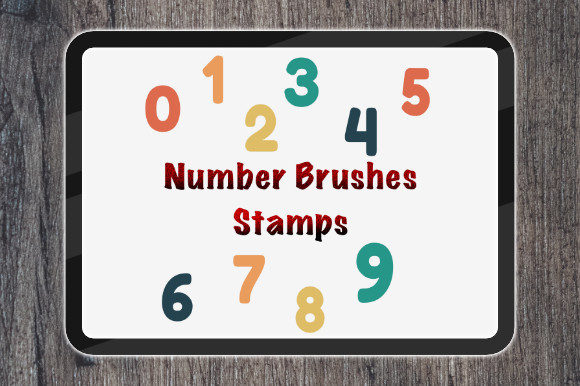
At their core, Number Brushes Stamps for Procreate are custom brush files that function as stamps rather than traditional drawing instruments. When selected, tapping the screen places a pre-designed numeral onto the canvas. This differs significantly from using the standard text tool or manually drawing numbers, as it combines the speed of stamping with the aesthetic consistency of a curated typeface or style. The primary value proposition lies in efficiency and stylistic cohesion. Artists who frequently incorporate numbers into their work—such as those creating infographics, comic panels with page numbers, or retail-themed illustrations—can save considerable time by avoiding repetitive manual entry or switching between applications.
The distribution format for these tools is typically straightforward. Users receive a single ZIP file containing the brush set. The installation process involves unzipping the file and importing it directly into the Procreate app. It is crucial to note that these brushes are engineered exclusively for the Procreate environment. They are not compatible with Adobe Photoshop or other desktop-based raster graphics editors. This exclusivity means that users must be committed to the iPad-based workflow to derive value from the product.
Technical Requirements and Compatibility
Before acquiring or utilizing Number Brushes Stamps for Procreate, it is vital to assess hardware and software compatibility. The requirements are specific:
- Hardware: An iPad Pro is recommended to ensure optimal performance, although other iPad models capable of running the latest software may also suffice. The processing power of the device impacts the responsiveness of stamping actions, especially in complex documents with multiple layers.
- Software: The Procreate app is required. Users must ensure they are running the most updated version of Procreate. Older versions may lack the necessary engine updates to support custom brush stamps correctly, leading to glitches or import failures.
- Incompatibility: These brushes will not function in Photoshop, Clip Studio Paint on desktop, or other non-Procreate platforms. Attempting to use them outside their intended ecosystem will result in errors.
This strict compatibility framework means that the tool is best suited for artists who have already standardized their workflow around Apple’s iPadOS and Procreate. For professionals who rely on a hybrid workflow involving both tablet and desktop environments, the inability to transfer these specific brush assets to Photoshop may present a significant tradeoff.
Benefits and Practical Applications
The decision to integrate number stamps into a digital toolkit often depends on the frequency and nature of numerical inclusion in one’s art. Several key benefits make Number Brushes Stamps for Procreate a strong fit for specific use cases:
- Workflow Efficiency: Manually typing text in Procreate can sometimes disrupt the flow of drawing, as it requires switching tools and adjusting text boxes. Stamping allows for immediate placement, maintaining the artist’s momentum.
- Stylistic Consistency: Hand-drawn numbers can vary in weight, angle, and proportion. Pre-made stamps ensure that every numeral shares the same visual characteristics, which is critical for professional-looking designs such as menus, price lists, or instructional diagrams.
- Creative Flexibility: Once stamped, the numbers reside on their own layer. This allows artists to resize, rotate, change colors, or apply additional effects without altering the underlying artwork. This non-destructive editing capability is a hallmark of effective digital design.
Situations where these brushes excel include creating educational materials, designing social media graphics with step-by-step instructions, or illustrating scenes involving calendars and clocks. In these contexts, the speed of deployment outweighs the need for highly customized typographic control.
Tradeoffs and Considerations
While efficient, Number Brushes Stamps for Procreate are not a universal solution. There are notable tradeoffs that potential users should evaluate:
Limited Typographic Control: Unlike the native text tool, brush stamps do not offer real-time spell-checking, font swapping, or easy paragraph formatting. If a mistake is made, the user must delete the stamped image and re-stamp the correct number, rather than simply editing a text string. This can become tedious if frequent corrections are anticipated.
Resolution Constraints: As with any raster-based brush, the quality of the stamp is dependent on the resolution at which it was created. While generally high-quality, extreme upscaling may reveal pixelation or softness compared to vector-based text tools. Users working on very large-format prints should test the stamps at full size to ensure clarity.
Ecosystem Lock-in: The inability to use these assets in Photoshop limits their utility for agencies or freelancers who must deliver source files in multiple formats. If a client requests an editable PSD file, the stamped numbers will appear as flat pixels, not editable text layers. This may require additional workarounds or redraws in the desktop environment.
Decision-Making Insights
To determine whether Number Brushes Stamps for Procreate align with your goals, consider the following questions:
- Do you frequently include numbers in your illustrations or designs?
- Is your primary workflow confined to the iPad and Procreate app?
- Do you prioritize speed and visual consistency over editable text flexibility?
- Are you comfortable managing file imports and ensuring software updates?
If the answer to these questions is affirmative, the brush set is likely a valuable addition to your library. It serves as a practical tool for enhancing productivity within a specific niche of digital art. However, if your work requires extensive typographic manipulation, cross-platform compatibility, or vector scalability, alternative methods such as using Procreate’s native text tool or integrating vector assets from desktop software may be more appropriate.
Ultimately, Number Brushes Stamps for Procreate represent a specialized utility rather than a fundamental necessity. They excel in streamlining repetitive tasks for iPad-centric artists but require careful consideration of their limitations regarding editability and platform exclusivity. By evaluating your specific workflow needs against these factors, you can make an informed decision about whether this toolset supports your creative objectives.