43 Pipes Illustrator Brushes: A Practical Guide for Technical and Industrial Design
In the realm of vector illustration, efficiency often dictates the quality and speed of workflow. For designers working on industrial themes, architectural diagrams, or steampunk aesthetics, manually drawing complex piping systems can be a tedious and error-prone process. This is where specialized toolsets like 43 Pipes Illustrator Brushes become valuable assets. This collection offers a curated set of Adobe Illustrator brushes designed to streamline the creation of pipelines, railings, and mechanical fittings. By understanding the specific capabilities and limitations of this toolkit, designers can determine whether it aligns with their current project requirements and long-term design goals.
Understanding the Toolkit Composition
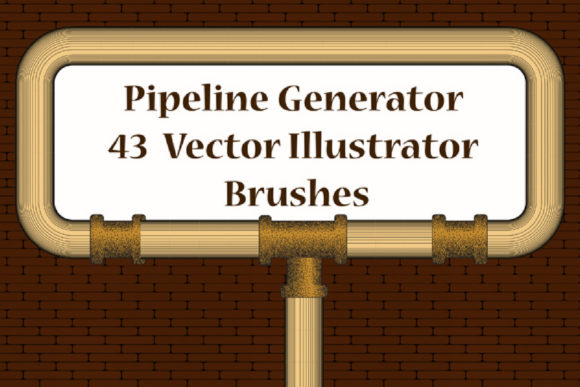
The core value of this package lies in its diversity and specialization. The collection is not merely a single brush type but a comprehensive system divided into distinct categories. It includes 36 pipe conduit pattern brushes that feature various fitting nozzles, allowing for seamless connections and realistic joint appearances. Additionally, there are 7 scatter brushes incorporating functional elements such as manometers, thermometers, and faucets. These components are essential for adding detail and authenticity to technical illustrations.
Compatibility is a significant factor for many users. The brushes are designed to work with Adobe Illustrator CS6 and above, ensuring that both legacy users and those on the latest Creative Cloud subscriptions can integrate them into their workflow. The inclusion of original AI Illustrator 10 and EPS 10 files provides further flexibility, allowing users to modify the base vectors if necessary. This backward compatibility ensures that the assets remain usable across different studio environments and software versions.
Key Benefits for Workflow Efficiency
One of the primary advantages of using 43 Pipes Illustrator Brushes is the ability to generate endless variations of railing ribbons, friezes, and edging with minimal effort. Traditional methods of drawing pipes require precise anchor point placement and consistent stroke widths, which can be time-consuming. With these pattern brushes, users can simply draw a path, and the brush automatically applies the texture and geometry of the pipe along that line. This feature significantly reduces the time spent on repetitive tasks.
Customization is another critical benefit. Users can easily adjust the color, size, and thickness of the brushes to match specific design guidelines. This adaptability is crucial when working on projects that require strict adherence to brand colors or technical standards. Furthermore, the ability to create step cadres, frames, and fast-draw pipeline plexus structures allows for rapid prototyping of complex mechanical layouts. For illustrators who need to produce multiple iterations of a design, this level of control enhances productivity without sacrificing visual quality.
Practical Applications and Use Cases
This toolkit is particularly well-suited for specific design niches. Architects and engineering illustrators may find these brushes useful for creating schematic diagrams where clarity and consistency are paramount. The inclusion of manometers and thermometers adds a layer of realism that is often difficult to achieve with generic shape libraries. Similarly, game designers and concept artists working on sci-fi or industrial settings can use these brushes to quickly populate backgrounds with intricate piping systems, freeing up time to focus on character design or narrative elements.
Graphic designers creating posters, infographics, or packaging with a mechanical or urban theme can also benefit from this collection. The ability to change the color and thickness of the pipes allows for seamless integration into various color palettes. Whether designing a vintage steampunk flyer or a modern industrial report cover, the versatility of the 43 Pipes Illustrator Brushes supports a wide range of aesthetic directions.
Considerations and Tradeoffs
While the benefits are clear, there are considerations to keep in mind. The learning curve for pattern brushes in Adobe Illustrator can be steep for beginners. Understanding how to adjust corner tiles and side tiles to ensure smooth transitions at angles requires some practice. Although a PDF help file with screenshots is included, users unfamiliar with Illustrator’s brush engine may need to invest time in mastering these tools before achieving optimal results.
Another consideration is the file size and organization. The ZIP archive is approximately 7 MB, which is relatively small and easy to download. However, managing 43 different brushes within the Illustrator library requires organizational discipline. Users may need to create custom brush libraries to keep their workspace uncluttered, especially if they frequently switch between different types of projects.
Additionally, while the brushes are compatible with CS6 and above, users on very old versions of Illustrator may encounter issues with certain advanced features. It is advisable to test the brushes in your specific version before committing to a large-scale project. The inclusion of EPS 10 files mitigates this risk to some extent, as these formats are widely supported, but native AI files offer better editing capabilities.
Comparing with Alternatives
When evaluating 43 Pipes Illustrator Brushes, it is helpful to consider alternatives. Generic shape libraries or manual drawing methods offer complete creative freedom but lack the speed and consistency of dedicated brushes. On the other hand, more expensive, comprehensive industrial design suites may offer a wider range of components but could be overkill for simple projects. This toolkit strikes a balance by providing a focused set of tools at a likely accessible price point, making it a strong choice for freelancers and small studios.
For users who require highly customized or non-standard fittings, the ability to modify the original AI files is a significant advantage. Many pre-made brush sets do not include editable source files, limiting the user to the provided designs. With this collection, designers can create their own brushes based on the provided templates, extending the utility of the package beyond its initial contents.
Making the Decision
To determine if this toolkit is right for you, consider your current workflow pain points. If you frequently find yourself spending excessive time drawing repetitive mechanical elements, these brushes can offer substantial time savings. Evaluate the frequency with which you work on industrial or technical themes. If such projects are rare, the investment in learning and integrating these brushes may not yield a high return. However, for regular users of such motifs, the efficiency gains are likely to justify the adoption of this toolset.
Also, assess your comfort level with Adobe Illustrator’s brush engine. If you are already familiar with pattern and scatter brushes, you will be able to leverage this collection immediately. If you are a beginner, consider the time required to learn these features alongside the PDF guide. The presence of support documentation is a positive indicator, suggesting that the creators have considered the user experience.
Final Thoughts
The 43 Pipes Illustrator Brushes represent a practical solution for designers seeking to enhance their efficiency in creating industrial and mechanical illustrations. With a robust set of pattern and scatter brushes, broad compatibility, and editable source files, this toolkit offers both immediate utility and long-term flexibility. By carefully considering your specific design needs and workflow habits, you can make an informed decision about whether this collection aligns with your professional goals. For those who value precision, speed, and customization in their vector artwork, this resource warrants serious consideration.