Master Meander Ornament Illustrator Brushes
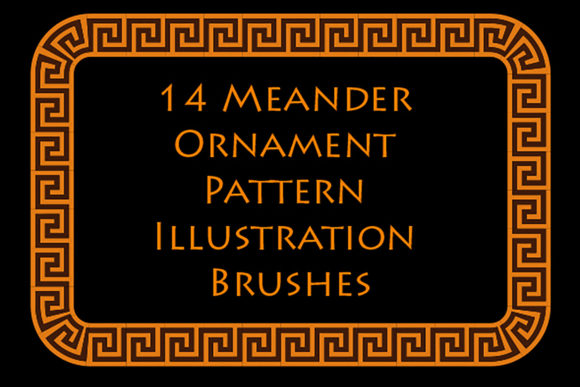
The history of design is often written in lines, and few lines are as enduring or recognizable as the meander. Originating from the winding path of the Great Menderes River in Asia Minor—modern-day Turkey—this continuous, looping motif has traveled through millennia to become a staple of classical aesthetics. Often referred to as the Greek fret or Greek key, the meander represents infinity and unity, making it a powerful visual tool for modern creators. For digital artists and graphic designers, replicating this intricate pattern by hand can be tedious and time-consuming. This is where Meander Ornament Illustrator Brushes transform the workflow, offering a seamless bridge between ancient artistry and contemporary digital efficiency.
Understanding the Digital Meander
At its core, a meander is a decorative border constructed from a continuous line, shaped into a repeated motif. While the concept is simple, executing it with perfect symmetry and consistent spacing requires precision. In Adobe Illustrator, creating these patterns manually involves complex pathfinding and alignment tools. However, specialized pattern brushes automate this process entirely. These brushes allow you to paint a vector path that automatically tiles the meander design along the stroke, ensuring that every corner and curve connects flawlessly.
The appeal of using dedicated Meander Ornament Illustrator Brushes lies in their flexibility. Unlike static images or pre-made clips, these brushes are dynamic. You can adjust the color, size, and thickness of the ornament instantly without losing resolution or clarity. Whether you need a delicate, hairline frieze for a wedding invitation or a bold, thick border for a architectural poster, the same brush asset adapts to your needs. This versatility makes them an invaluable resource for anyone looking to incorporate Ancient Greek style into their projects without getting bogged down in technical construction.
Practical Applications for Creators
The utility of these brushes extends far beyond historical recreations. While they are perfect for projects requiring an authentic classical look, such as museum exhibitions, history textbooks, or period-accurate branding, their application in modern design is equally profound. The clean, geometric nature of the Greek key design complements minimalist aesthetics, adding structure and elegance without overwhelming the viewer.
- Branding and Packaging: Luxury brands often utilize meander patterns to convey heritage, stability, and high quality. Using these brushes, designers can quickly create custom borders for product labels, business cards, and packaging boxes that stand out on shelves.
- Web and UI Design: In digital interfaces, subtle ornamental dividers can guide the user’s eye and separate content sections. A thin meander line serves as a sophisticated alternative to standard horizontal rules, adding a touch of personality to websites and apps.
- Interior and Textile Design: For those working in surface pattern design, these brushes help visualize how borders will look on textiles, wallpapers, or ceramics. The ability to scale the pattern endlessly allows for rapid prototyping of repeat designs.
- Educational Materials: Educators and textbook publishers can use these assets to create engaging headers and footers for history or art literature, enhancing the visual appeal of educational content while maintaining thematic relevance.
Technical Compatibility and Ease of Use
One of the primary concerns for designers adopting new assets is compatibility. High-quality Meander Ornament Illustrator Brushes are typically designed to work across various versions of Adobe Illustrator, ensuring that freelancers and agencies with different software setups can collaborate seamlessly. For instance, a robust package might include files compatible with Illustrator CC, as well as older CS versions and even EPS 8 formats. This backward compatibility is crucial for professionals who may need to share files with clients or colleagues using legacy systems.
Furthermore, the inclusion of original AI and EPS files empowers users to customize the brushes further. If the default ten Ancient Greek ornamentation patterns do not perfectly match a specific vision, designers can modify the base vectors to create their own unique variations. This level of control ensures that the tool remains useful regardless of the project's specific demands. Additionally, a comprehensive PDF help file with screenshots can significantly reduce the learning curve, guiding beginners through the installation and application process step-by-step.
Why Choose Vector Brushes Over Raster Images?
When decorating frames and borders, some designers might be tempted to use raster images (JPEGs or PNGs) of meander patterns. However, this approach has significant limitations. Raster images pixelate when scaled up, making them unsuitable for large-format printing like banners or billboards. In contrast, vector-based brushes remain crisp and sharp at any size. This scalability is essential for professional output, where print quality cannot be compromised.
Moreover, vector brushes allow for non-destructive editing. You can change the stroke weight or color of a meander border after it has been drawn, something that is impossible with a flattened raster image. This flexibility speeds up the revision process, allowing designers to experiment with different looks rapidly. For example, you might start with a black border for a draft, then switch to a gold gradient for the final luxury presentation with just a few clicks.
Considerations Before You Start
While these tools simplify the design process, there are a few things to keep in mind to ensure the best results. First, consider the context of your design. The meander is a strong visual element; using it too aggressively can clutter a layout. It is often most effective when used sparingly as an accent rather than a dominant feature. Second, pay attention to the corner handling. Good pattern brushes handle corners automatically, but complex angles may require manual adjustment to maintain the continuity of the line.
Finally, always check the license terms if you are using these brushes for commercial client work. Most reputable creators allow commercial use, but it is good practice to verify this beforehand. With a small file size, such as a 640 Kb ZIP archive, these assets are easy to store and share, making them a lightweight addition to any designer’s toolkit.
Incorporating Meander Ornament Illustrator Brushes into your workflow is more than just a time-saving measure; it is an investment in the quality and professionalism of your designs. By leveraging these digital tools, you honor the legacy of ancient craftsmanship while embracing the efficiency of modern technology. Whether you are a beginner looking to add flair to your first portfolio piece or a seasoned pro streamlining your production pipeline, these brushes offer a reliable, elegant solution for creating timeless borders and frames.