24 Big Data Illustrator Brushes Part 3
In the rapidly evolving landscape of digital design, the demand for assets that communicate complexity with clarity has never been higher. Designers, data analysts, and content creators are constantly seeking tools that bridge the gap between raw information and visual storytelling. This is where specialized resources like 24 Big Data Illustrator Brushes - Part3 become invaluable. These techno pattern vector Adobe Illustrator brushes are not merely decorative elements; they are functional building blocks for constructing frames, borders, and intricate backgrounds in a distinct technological style.
Whether you are crafting a futuristic infographic, designing a tech-focused brand identity, or adding subtle digital texture to a web layout, this bundle offers a versatile toolkit. By leveraging these brushes, users can easily generate futuristic mandalas, endless ribbons, friezes, and edging. The ability to modify color, size, and thickness on the fly allows for seamless integration into any project, while combining several brushes can yield surprisingly complex and unique results.
Understanding the Toolkit
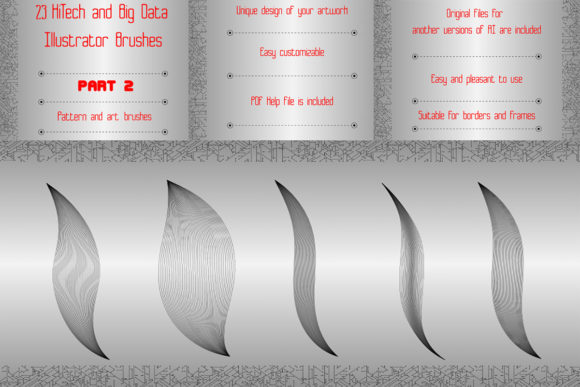
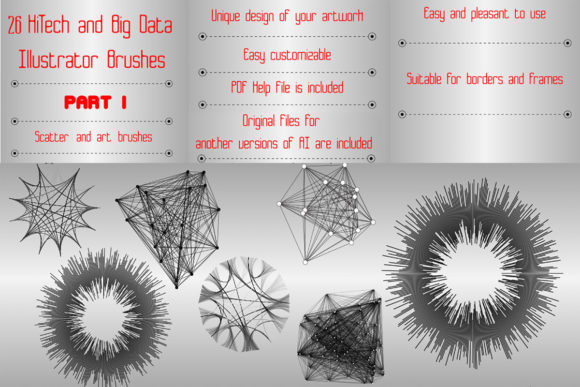
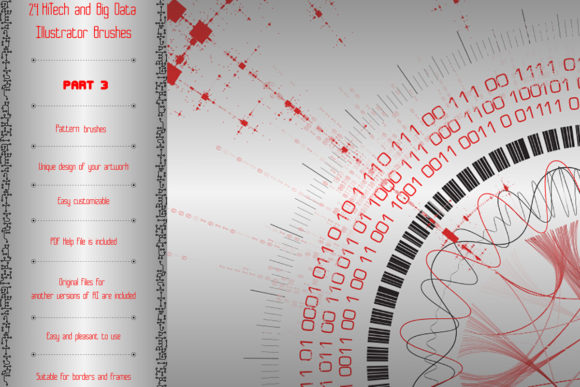
At its core, this collection provides twenty-four distinct pattern vector brushes designed specifically for Adobe Illustrator. The contents are diverse, covering a wide spectrum of "big data" visualization aesthetics. You will find elements such as clusters, diagrams, sinusoids, matrices, scales, radio circuits, and gene card elements. These are not static images but dynamic brush strokes that adapt to the path you draw.
The technical specifications ensure broad accessibility. The bundle includes original AI Illustrator 10 and EPS 10 files, making it compatible with Illustrator CS5 and above. For those who prefer customization, the files allow you to create your own variations within your specific version of Illustrator. A PDF help file with screenshots is included to guide users through installation and application, ensuring that even those less familiar with brush settings can get started quickly. The entire ZIP archive is a lightweight 5.51 MB, making it easy to store and share.
Why Different Creators Care
The value of 24 Big Data Illustrator Brushes - Part3 varies significantly depending on your role and objectives. What matters most to a freelance graphic designer might differ from the priorities of a corporate marketing manager or an educational content developer.
For Professional Designers and Freelancers
For experienced users, time is money. The primary appeal here is efficiency and flexibility. Instead of manually drawing complex circuit boards or data nodes, a professional can apply a brush stroke to a path and achieve a polished look in seconds. The ability to change the color, size, or thickness instantly means these assets can be adapted to fit various client brand guidelines without starting from scratch.
Moreover, the quality of the vector files ensures scalability. Whether the final output is a business card or a large-format trade show banner, the lines remain crisp. Professionals also appreciate the "endless ribbon" and "frieze" options, which are perfect for creating seamless borders for reports, presentations, or website headers. The inclusion of EPS 10 files guarantees compatibility with other vector software, adding to the long-term usefulness of the purchase.
For Beginners and Hobbyists
If you are new to Adobe Illustrator, the prospect of creating intricate techno patterns can be daunting. This bundle lowers the barrier to entry. The included PDF help file with screenshots is a critical resource, offering step-by-step guidance. Beginners can experiment with combining several brushes to see how different elements interact, fostering a deeper understanding of how brush dynamics work in Illustrator.
Hobbyists often prioritize creativity and ease of use over commercial viability. These brushes allow non-experts to produce high-quality, professional-looking art for personal projects, such as custom gaming overlays, sci-fi fan art, or personalized tech-themed gifts. The low file size and straightforward installation process mean there is little technical friction, allowing hobbyists to focus on the fun of creation rather than troubleshooting software issues.
For Marketers and Entrepreneurs
Small business owners and marketers often need to produce high volumes of content with limited resources. When promoting a tech startup, a SaaS product, or a cybersecurity service, the visual language must convey innovation and reliability. These brushes provide an instant "tech" aesthetic that resonates with target audiences in these sectors.
Entrepreneurs can use these elements to decorate social media posts, email newsletters, or pitch decks. The "big data visualization elements" like matrices and scales can serve as abstract background textures that suggest analytics and precision without cluttering the message. The cost-effectiveness of a one-time purchase for a reusable asset library aligns well with the budget-conscious nature of small businesses.
For Educators and Publishers
Educators creating materials for STEM subjects can benefit from the scientific accuracy implied by elements like gene cards and radio circuits. While these are stylized, they provide a recognizable visual shorthand for complex topics. Publishers producing textbooks or journals in technology, biology, or physics can use these brushes to create consistent chapter headers, sidebars, or diagram frames that maintain a cohesive look throughout a publication.
Practical Applications and Use Cases
To truly understand the potential of 24 Big Data Illustrator Brushes - Part3, consider these practical scenarios:
- Infographic Design: Use the sinusoid and cluster brushes to create connecting lines between data points, giving a sense of flow and connectivity in network diagrams.
- Web UI Elements: Apply the frieze and edging brushes to create unique dividers or section breaks on a technology blog or app interface.
- Presentation Decks: Frame key statistics or quotes using the futuristic mandala brushes to draw attention and add visual interest to slide layouts.
- Product Packaging: Utilize the radio circuit and matrix patterns as subtle background textures on packaging for electronic goods or software boxes.
- Social Media Graphics: Combine multiple brushes to create eye-catching borders for Instagram stories or LinkedIn posts announcing tech-related news.
Evaluating Fit for Your Needs
Before integrating this bundle into your workflow, consider your specific priorities. If you value speed and consistency, these brushes are an excellent investment. They eliminate the need to recreate common tech motifs from scratch. If customization is your main concern, the fact that you can make any brush for yourself in your Illustrator version offers significant long-term value.
However, if you are looking for pre-made, static icons or illustrations, this tool may require a learning curve. These are brushes, meaning they require you to draw paths. This offers greater flexibility but demands a basic understanding of the Pen Tool or Shape Tools in Illustrator. For those willing to invest a small amount of time in learning the basics, the payoff in creative freedom is substantial.
The compatibility with Illustrator CS5 and above ensures that most users will face no technical hurdles. The lightweight nature of the download (5.51 MB) means it won’t bog down your system or storage. Furthermore, the option to rate the product suggests a community-driven aspect, where user feedback can help future buyers gauge satisfaction.
Final Thoughts on Utility and Value
In a digital world saturated with generic templates, having access to specialized, high-quality assets like 24 Big Data Illustrator Brushes - Part3 can set your work apart. Whether you are a seasoned designer looking to streamline your workflow, a marketer aiming to enhance your brand’s tech credibility, or a student exploring digital art, this bundle offers a robust set of tools. The combination of versatility, ease of use, and professional-grade vector quality makes it a worthwhile addition to any creative arsenal. By understanding how these elements can be manipulated and combined, you unlock a new level of efficiency and artistic expression in your technological designs.