Unlocking Vibrant Textures with Procreate Realistic Tie Dye Brushes
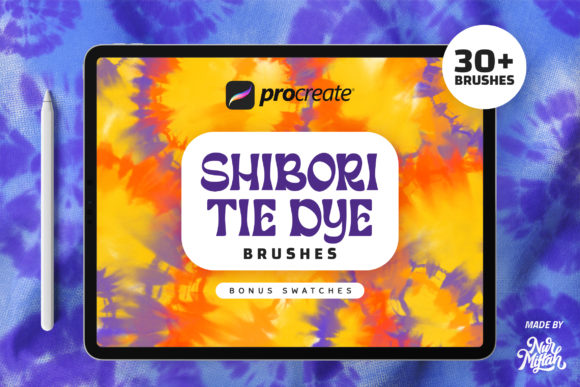
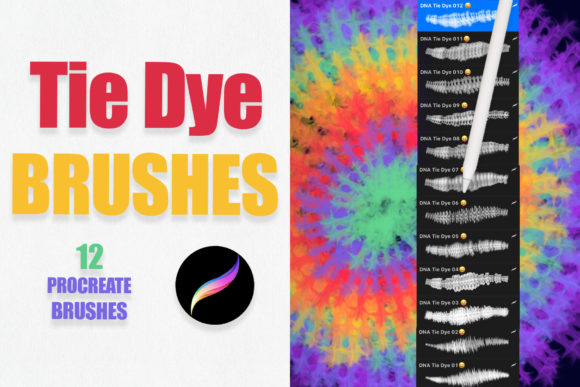
The digital art landscape has evolved rapidly, moving far beyond simple line work and flat colors. Today, artists, designers, and hobbyists alike are seeking tools that bridge the gap between traditional media chaos and digital precision. Among the most exciting developments in this space is the rise of specialized brush sets that mimic complex physical processes. One such tool that has captured the imagination of the creative community is the collection known as Procreate Realistic Tie Dye Brushes. These digital assets offer a unique way to introduce organic, fluid, and unpredictable textures into your artwork without the mess of actual dye and fabric.
For those unfamiliar with the intricacies of digital texturing, understanding how these brushes function can significantly enhance your workflow. Unlike standard round or square brushes, tie-dye brushes are engineered to replicate the bleeding, blending, and swirling effects of liquid dye on absorbent material. This allows for a level of artistic expression that feels both nostalgic and modern, suitable for a wide array of projects ranging from casual sketches to professional commercial designs.
The Mechanics of Digital Fluidity
To truly appreciate the value of Procreate Realistic Tie Dye Brushes, it is essential to understand the technology behind them. These are not merely static stamps; they are dynamic tools built to interact with the Procreate engine’s pressure sensitivity and tilt features. When you use an Apple Pencil or any stylus that supports pressure sensitivity on an iPad Pro or standard iPad, the brush responds to the force and angle of your stroke. A light touch might create a subtle, watery bleed, while a heavier press can result in a saturated, intense pool of color.
The core characteristic of these brushes is their ability to simulate transparency and layering. In traditional tie-dye, colors mix physically on the fabric. In Procreate, this is achieved through blend modes and opacity settings embedded within the brush definition. The files you receive typically come in a single .brushset format, contained within a zip file. Once imported, these brushes allow you to layer colors seamlessly. Because the stamps have transparent backgrounds, you are not locked into a specific look. You can add your own textures, underlying patterns, or additional color gradients beneath the dye effect, creating a composite image that feels deep and tactile.
Versatility Across Creative Industries
While the name suggests a specific aesthetic, the utility of these brushes extends far beyond recreating 1970s fashion trends. The organic nature of the dye splatter and swirl makes them incredibly versatile for various design disciplines. Here is how different creators are integrating these tools into their modern workflows:
- Tattoo Design: Tattoo artists often look for ways to visualize how ink will settle and spread under the skin. The bleeding effect of realistic tie-dye brushes can help in drafting watercolor-style tattoo concepts or designing background elements that mimic the soft edges of healed ink.
- Invitations and Greeting Cards: For wedding planners and stationery designers, adding a touch of whimsy is crucial. These brushes can create vibrant, celebratory backgrounds for birthday cards, baby shower invitations, or festival-themed event posters. The ability to customize colors means you can match any brand palette or theme perfectly.
- Logo and Branding: Modern branding often leans towards authenticity and handcrafted feels. A logo incorporating a subtle tie-dye element can convey creativity, youth, and flexibility. It is particularly effective for brands in the lifestyle, music, or wellness sectors.
- Digital Fashion and Textiles: Fashion designers using Procreate for initial sketches can use these brushes to mock up fabric patterns quickly. It allows for rapid prototyping of textile designs before committing to physical sampling.
Technical Requirements and Compatibility
Before diving into the creative possibilities, it is important to address the technical prerequisites. As noted in the product details, these files are ONLY compatible with the Procreate app. This means you will need an iPad running iOS with Procreate installed. While the app itself is affordable, the hardware requirements are specific. You will need an iPad Pro or a standard iPad paired with an Apple Pencil or a third-party stylus that supports pressure sensitivity.
Why is pressure sensitivity so critical? Without it, the brushes lose their primary advantage. The variation in line weight and opacity that mimics real dye application relies entirely on the tablet’s ability to detect how hard you are pressing. If you are using a basic capacitive stylus without pressure data, the brushes will still work, but they will produce uniform, less natural results. Therefore, investing in a proper pen input device is non-negotiable for achieving the "realistic" aspect of the tool.
Enhancing Your Creative Workflow
Integrating Procreate Realistic Tie Dye Brushes into your daily routine can streamline several tedious processes. Traditionally, creating a tie-dye effect digitally would require complex masking, multiple layers of noise filters, and manual blending with smudge tools. This process is time-consuming and often yields inconsistent results. With a dedicated brush set, what once took hours can be achieved in minutes.
Consider the scenario of creating a promotional graphic for a summer music festival. Instead of searching for stock photos of tie-dye shirts—which may have licensing restrictions or poor resolution—you can generate unique, high-resolution backgrounds directly in Procreate. You can experiment with neon greens, electric blues, and hot pinks, adjusting the opacity until the vibe is perfect. Because there are no limits to your creativity, you can combine these brushes with other Procreate features like liquify, perspective warp, and adjustment layers to distort and refine the pattern until it fits your composition exactly.
Furthermore, the transparent nature of these brushes encourages experimentation. You are not stuck with the initial color drop. You can change the hue, saturation, and brightness of your layers at any point. This non-destructive workflow is a hallmark of professional digital art, allowing for endless iterations without starting from scratch. Whether you are a seasoned illustrator or a beginner looking to add flair to your journaling, these tools lower the barrier to entry for complex textural effects.
Tips for Maximizing Results
To get the most out of your purchase, consider these practical recommendations:
- Layer Management: Use separate layers for each color application. This allows you to move, resize, or adjust the opacity of individual dye spots without affecting the others.
- Blend Modes: Experiment with layer blend modes such as Multiply, Overlay, or Color Dodge. These modes interact with the layers beneath them, creating richer, more complex interactions between colors.
- Texture Overlays: Since the brushes have transparent backgrounds, try placing a paper texture or canvas grain layer above your dye work. Set this top layer to Overlay or Soft Light to give the entire piece a unified, physical feel.
- Color Theory: Tie-dye works best with contrasting or analogous color schemes. Use a color wheel to pick harmonious combinations that pop against each other, ensuring your design remains visually engaging.
In conclusion, the Procreate Realistic Tie Dye Brushes represent more than just a novelty item; they are a powerful addition to the digital artist's toolkit. By combining the unpredictability of traditional media with the control of digital software, they open up new avenues for expression in tattoo design, graphic arts, and personal projects. With the right hardware and a willingness to experiment, these brushes can transform your iPad into a vibrant studio capable of producing stunning, organic textures with ease.