30 Transparent Petal Illustrator Brushes
Digital illustration often feels limited by the rigidity of vector tools. While precision is a strength, achieving organic, ethereal, or delicate textures can be time-consuming. This is where specialized toolsets change the workflow entirely. The 30 Transparent Petal Illustrator Brushes collection offers a streamlined solution for designers seeking to add depth, transparency, and futuristic elegance to their projects without manual complexity.
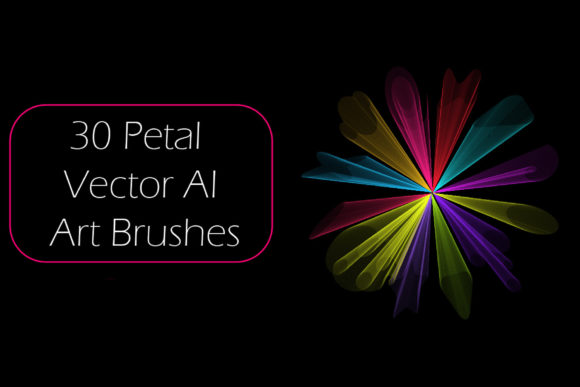
These brushes are not just simple stamps; they are dynamic vector art brushes designed to create clear, delicate lines that mimic the structure of abstract petals, openwork flowers, and fluid waves. By integrating these tools into Adobe Illustrator, artists can instantly transform flat compositions into layered, scientific, or futuristic visual narratives.
Understanding the Design Aesthetic
The core appeal of this brush set lies in its ability to generate transparent openwork effects. In traditional digital painting, achieving transparency requires careful layer management and opacity adjustments. With these vector brushes, the transparency is built into the stroke profile. As you draw, the brush creates overlapping lines that naturally produce a sense of depth and intricacy.
The term "futuristic" here refers to the clean, precise, and almost architectural quality of the lines. Unlike hand-drawn sketches that may vary in width unpredictably, these brushes maintain a consistent, sleek aesthetic. This makes them ideal for projects that require a modern, tech-forward, or biological-scientific look. Imagine designing a logo for a biotech startup, a cover for a science fiction novel, or packaging for high-end skincare products. The delicate line work suggests precision, care, and innovation.
Practical Applications for Creators
One of the most significant advantages of using the 30 Transparent Petal Illustrator Brushes is versatility. They are not limited to floral designs. Because the shapes are abstract, they can be manipulated to serve various decorative purposes. Here are several practical ways professionals and hobbyists can utilize this toolkit:
- Background Textures: Create subtle, non-intrusive backgrounds for websites or presentations. The transparent nature ensures that text placed over the artwork remains readable.
- Abstract Compositions: Combine multiple strokes to build complex, wave-like structures. These can serve as central focal points in poster design or album covers.
- Scientific Illustrations: The clean lines mimic cellular structures or microscopic views, making them perfect for educational materials or medical branding.
- Fashion and Textile Design: Use the repeating patterns to create unique prints for fabrics, scarves, or digital fashion mockups.
For beginners, the learning curve is minimal. You do not need to understand complex pathfinder operations or mesh gradients. Simply select the brush, choose a color, and draw. The software handles the rendering of the transparent overlaps automatically.
Technical Compatibility and Ease of Use
A common concern when purchasing digital assets is compatibility. Will these brushes work with your current version of Adobe Illustrator? The 30 Transparent Petal Illustrator Brushes are designed with broad accessibility in mind. They are fully compatible with Illustrator CS6 and all subsequent versions. This ensures that whether you are using a legacy system or the latest Creative Cloud update, the tools will function correctly.
The download package is remarkably lightweight, with a ZIP archive size of only 0.99 MB. This small footprint means quick downloads and easy storage, even on devices with limited space. Inside the archive, you will find:
- Ai Illustrator 10 Files: The native brush library file, ready to load directly into your workspace.
- EPS 10 Files: Encapsulated PostScript files that ensure compatibility with other vector-based software if needed.
- PDF Help File: A comprehensive guide with screenshots. This document walks you through the installation process and offers tips on customizing the brushes.
The inclusion of original files is a significant value-add. It allows advanced users to deconstruct the brushes. If you want to modify the shape of a petal or adjust the transparency levels, you can edit the source vectors. This flexibility empowers creators to make any brush for themselves in their Illustrator version, tailoring the tools to specific project needs.
Enhancing Workflow Efficiency
Time is a critical resource for freelancers, marketers, and small business owners. Creating intricate line art from scratch can take hours. Using pre-made, high-quality brushes reduces this time to minutes. For entrepreneurs creating social media content, this efficiency translates to consistent posting schedules and higher-quality visuals without hiring expensive graphic designers.
Consider a blogger writing about wellness or mindfulness. Instead of searching for stock photos that may look generic, they can use these brushes to create unique, calming header images. The abstract, delicate lines evoke a sense of peace and clarity, aligning perfectly with the content’s tone. Similarly, educators can use these tools to create engaging diagrams that are visually appealing yet clear enough for instructional purposes.
Important Considerations Before Use
While these brushes are powerful, understanding their limitations helps maximize their potential. Since they are vector-based, they scale infinitely without losing quality. However, the visual effect of transparency depends on the stacking order of your paths. When drawing complex compositions, it is essential to manage layers effectively. Overlapping too many strokes in one area can sometimes create unintended dark spots, so experimentation is key.
Additionally, while the brushes are ready to use, customizing stroke weights can dramatically change their appearance. A thinner stroke may look more like a fine wire or hair, suitable for delicate jewelry designs. A thicker stroke might resemble a ribbon or a broader leaf, ideal for bold graphic statements. The PDF help file included in the package provides screenshots that illustrate these adjustments, making it easier for new users to grasp these concepts quickly.
It is also worth noting that these brushes are best suited for decorative and illustrative purposes. They are not intended for photorealistic rendering. Embracing their abstract, stylized nature allows for the most creative freedom. Trying to force them into realistic roles may result in disjointed visuals. Instead, lean into the futuristic, artistic vibe they naturally provide.
Final Thoughts on Value and Quality
The 30 Transparent Petal Illustrator Brushes represent a smart investment for anyone looking to elevate their vector art. The combination of aesthetic beauty, technical compatibility, and user-friendly documentation makes them accessible to a wide audience. From seasoned professionals seeking to speed up their workflow to beginners eager to explore digital illustration, this toolset offers immediate value.
The ability to create transparent, openwork flowers and abstract compositions with just a few clicks removes technical barriers, allowing creativity to flow more freely. Whether you are designing a brand identity, decorating a digital portfolio, or creating educational content, these brushes provide a distinctive look that stands out in a crowded digital landscape.
If you find these tools helpful in enhancing your artwork, consider rating the product. Feedback helps developers improve future releases and assists other creators in finding reliable resources. Thank you for exploring the possibilities of transparent line art in your next project.