Integrating 30 Mathematical Illustrator Brushes into Professional Design Workflows
In the realm of technical illustration, educational content creation, and scientific publishing, visual consistency is not merely an aesthetic preference; it is a functional necessity. Designers, educators, and publishers often face the tedious task of manually recreating mathematical symbols, equations, and graphical elements to ensure they align with the overall design language of a document or presentation. This is where specialized assets like 30 Mathematical Illustrator Brushes become invaluable. Rather than treating these tools as simple decorative add-ons, professionals can integrate them into a broader workflow to enhance efficiency, maintain stylistic coherence, and reduce production time.
This collection serves as a bridge between raw mathematical data and polished visual communication. By understanding how to deploy these brushes effectively within Adobe Illustrator, creators can streamline the process of generating complex diagrams, educational handouts, and scientific posters. The key lies in viewing these brushes not just as static images, but as dynamic components of a flexible design system.
Understanding the Asset Composition and Compatibility
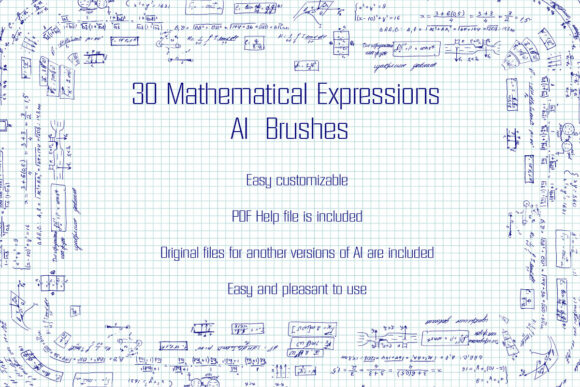
Before integrating any new asset into a professional pipeline, it is crucial to understand its technical specifications and compatibility. The 30 Mathematical Illustrator Brushes package is designed with versatility in mind, catering to users across various versions of Adobe Illustrator. The collection includes original files in Ai Illustrator 10 and EPS 10 formats, ensuring backward compatibility with older systems while remaining fully functional in modern iterations such as Illustrator CS5 and beyond.
The archive, compact at 7.42 MB, contains two distinct types of vector brushes that serve different purposes in the design process:
- 24 Scatter Vector Brushes: These are crafted to mimic handwritten educational and scientific drafts. They are ideal for creating organic, natural-looking annotations, marginalia, and informal explanatory notes that soften the rigid nature of technical diagrams.
- 6 Pattern Vector Brushes: These feature handwritten math expressions and equations. They are specifically engineered for creating continuous lines, borders, and structural elements that require repetitive mathematical symbolism.
Including a PDF help file with screenshots ensures that even users who are less familiar with advanced brush settings can quickly onboard. This documentation is a critical component of the workflow, reducing the learning curve and allowing teams to standardize their usage of the brushes across multiple projects.
Pre-Production: Planning and Style Definition
The effective use of 30 Mathematical Illustrator Brushes begins before a single vector path is drawn. During the planning phase of an educational module, scientific paper, or technical blog post, designers must decide on the visual tone. Will the material feel strictly academic and rigid, or approachable and hand-drawn? These brushes lean towards the latter, offering a "handwritten" aesthetic that can make complex subjects feel more accessible.
When preparing a project, consider the following steps:
- Audience Analysis: For younger students or general public outreach, the scatter brushes provide a friendly, non-intimidating look. For higher-level academic journals, the pattern brushes can be used sparingly for section dividers or subtle background textures.
- Color Palette Selection: Since these are vector brushes, they are fully editable. Decide on a primary and secondary color scheme that aligns with your brand or publication guidelines. The ability to change color, size, and thickness means you can adapt the brushes to fit dark mode interfaces, print publications, or projected presentations without losing quality.
- Template Creation: Set up master layers in your Illustrator file where these brushes will reside. This prevents accidental editing and ensures that the mathematical elements remain consistent throughout the document.
Execution: Integrating Brushes into the Design Process
During the active design phase, the 30 Mathematical Illustrator Brushes can significantly accelerate the decoration and structuring of your work. The primary advantage of using pattern vector brushes for mathematical expressions is the ability to generate endless ribbons, friezes, and edging. Instead of typing out individual equations and aligning them manually, you can apply a pattern brush to a path, instantly creating a border composed of integrals, summations, or algebraic variables.
Creating Structural Elements
Use the six pattern brushes to define sections within a poster or infographic. For example, a horizontal line created with a pattern brush can separate a header from the main content, subtly reinforcing the scientific theme without overwhelming the reader. Because these are vectors, you can scale the stroke weight to match the hierarchy of your layout. A thicker stroke might denote a major section break, while a thinner stroke could separate subsections.
Adding Contextual Annotations
The 24 scatter brushes are particularly useful for adding context to graphs and diagrams. In a physics illustration, for instance, you might need to highlight specific forces or variables. Using a scatter brush that mimics a handwritten draft allows you to circle key areas or draw arrows with a natural, human touch. This contrasts effectively with the precise, computer-generated lines of the graph itself, drawing the viewer’s eye to the most important information.
To implement this efficiently:
- Draw your base path using the Pen Tool or Pencil Tool.
- Apply the desired mathematical brush from the Brushes panel.
- Use the Stroke panel to adjust the scaling and spacing. For scatter brushes, adjusting the spacing can create a denser or more sparse effect, depending on whether you want a subtle texture or a bold statement.
- Expand the appearance if necessary for final output, though keeping them live allows for easier edits during the review process.
Post-Production: Quality Control and Adaptation
Once the initial design is complete, the flexibility of vector brushes aids in the refinement stage. One common challenge in technical design is ensuring that elements look good at various sizes. Because the 30 Mathematical Illustrator Brushes are vector-based, they retain crisp edges regardless of scaling. This is essential for multi-platform distribution, where a single design might need to serve as a high-resolution print poster and a low-resolution web thumbnail.
During quality control, check for visual clutter. Mathematical symbols can become noisy if overused. Ensure that the brushes enhance readability rather than detract from it. If a pattern brush feels too dense, reduce the opacity or switch to a simpler scatter brush for that section. The included PDF help file can be referenced here to troubleshoot any rendering issues or to learn how to customize the brush settings further.
Customization and Long-Term Workflow Integration
A significant advantage of this package is the inclusion of original Ai and EPS files. This allows advanced users to modify existing brushes or create new ones tailored to specific needs. If your project requires a specific symbol not included in the set, you can use the provided files as a template. By understanding the construction of these brushes, you can build a proprietary library that evolves with your brand or educational curriculum.
For teams, this means establishing a standardized asset library. Store the 30 Mathematical Illustrator Brushes on a shared server or cloud storage, ensuring that all designers have access to the same versions. This promotes consistency across large projects, such as textbook series or multi-part online courses. Furthermore, because the brushes are compatible with Illustrator CS5 and later, there is no need for costly software upgrades to utilize them, making them a cost-effective solution for freelancers and small businesses.
Practical Use Cases Across Industries
The versatility of these brushes extends beyond traditional academia. Here are several scenarios where they add value:
- EdTech Startups: Create engaging app interfaces and tutorial videos where mathematical concepts are explained visually. The handwritten style adds a personal, tutor-like feel.
- Scientific Marketing: Design infographics for pharmaceutical or tech companies that need to display data without appearing dry. Mathematical borders can frame key statistics elegantly.
- Publishing: Layout designers can use the pattern brushes for chapter headings or page borders in STEM textbooks, adding a thematic layer to the typography.
- Freelance Illustrators: Offer specialized services for clients needing custom scientific illustrations. Having a pre-made set of high-quality brushes reduces billable hours spent on repetitive tasks.
In conclusion, 30 Mathematical Illustrator Brushes are more than just a collection of shapes; they are a workflow enhancer. By integrating them thoughtfully into the planning, execution, and refinement stages of your projects, you can achieve a professional, cohesive look that communicates complex ideas clearly. Whether you are decorating a simple blog post or designing a comprehensive educational curriculum, these tools provide the flexibility and precision needed for high-quality scientific visualization.