72 Brilliant Paints Illustrator Brushes
Digital illustration often suffers from a sterile, overly perfect aesthetic. While vector graphics offer unparalleled scalability and precision, they can sometimes lack the organic warmth and tactile feel of traditional media. This is where specialized tools become essential for bridging the gap between digital efficiency and artistic soul. The 72 Brilliant Paints Illustrator Brushes collection addresses this exact need, providing designers and artists with a robust toolkit to inject life, texture, and movement into their Adobe Illustrator projects.
Whether you are working on a high-end branding package, creating intricate editorial illustrations, or designing packaging that needs to stand out on a shelf, the ability to mimic natural media is invaluable. This brush set allows you to achieve glossy smears, delicate swabs, bold strokes, and textured daubs with ease. It transforms the rigid nature of vector paths into something that feels hand-painted, offering a level of expressiveness that standard stroke profiles simply cannot match.
Bridging the Gap Between Vector and Traditional Media
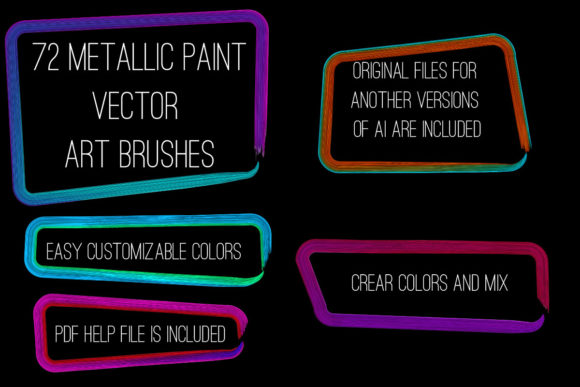
The core strength of the 72 Brilliant Paints Illustrator Brushes lies in its versatility. The collection includes 72 distinct brushes that cover a wide spectrum of metallic and paint effects. From brilliant brights to pale metals, the range of shades allows for nuanced color blending and pure color applications. This diversity means you are not limited to a single style; instead, you have a comprehensive palette that can adapt to various artistic directions.
One of the most compelling features is the ability to create realistic metallic finishes. Whether you are aiming for the cool sheen of silver, the warm glow of gold, or the industrial look of steel, these brushes provide the necessary visual cues. The inclusion of both acrylic and oil paint imitations means you can choose between the fast-drying, crisp edges of acrylics or the rich, blended textures associated with oil paints. This duality allows for greater creative freedom, enabling artists to match the brush style to the mood of the artwork.
Key Characteristics and Technical Compatibility
For professional workflows, compatibility is non-negotiable. This brush set is designed to work seamlessly with Adobe Illustrator CS6 and all subsequent versions. This broad compatibility ensures that whether you are using the latest Creative Cloud release or maintaining an older stable version for specific client requirements, the tools will function as intended. The package includes original AI Illustrator 10 and EPS 10 files, ensuring that the assets remain accessible and editable across different software environments.
The technical execution of these brushes is equally impressive. Each brush is crafted to allow for easy manipulation of color, size, and thickness. You are not locked into a predefined appearance. If a stroke feels too heavy, you can adjust the weight instantly. If the color needs to shift from a deep bronze to a bright copper, the vector nature of the brushes allows for quick recoloring without loss of quality. This flexibility is crucial for iterative design processes where changes are frequent and rapid.
Additionally, the collection comes with a PDF help file containing screenshots and instructions. This resource is particularly helpful for users who may be new to custom brush libraries in Illustrator. It reduces the learning curve, allowing you to start creating immediately rather than spending hours troubleshooting installation or usage issues. The entire ZIP archive is 56.7 MB, a manageable size that includes high-quality data without bloating your hard drive.
Practical Applications in Professional Design
The utility of the 72 Brilliant Paints Illustrator Brushes extends far beyond simple decoration. In professional settings, these tools can significantly enhance branding, packaging, and marketing materials. Consider the impact of a logo that features a subtle, hand-painted metallic edge. It conveys craftsmanship and attention to detail, qualities that resonate with consumers looking for premium products. By using these brushes, designers can add that layer of perceived value without the time-consuming process of painting physically and scanning the results.
In the realm of packaging design, texture is key. Consumers are drawn to packages that look and feel tangible, even through a screen. These brushes allow for the creation of realistic friezes, edging, and brushstroke ribbons that can simulate embossed or foil-stamped effects. This capability is particularly useful for mockups, where clients need to visualize how a design will look in production. Instead of relying on complex Photoshop overlays, you can achieve similar results directly within Illustrator, keeping your workflow vector-based and editable.
Enhancing Editorial and Digital Art
For illustrators and content creators, these brushes offer a way to break the monotony of flat design. Editorial illustrations often benefit from a more expressive, loose style. The ability to quickly draw imitation paintings using the brushstroke cadre and frames provided in this set allows for faster concept development. You can sketch out ideas with a painterly feel, then refine them into polished vector art. This hybrid approach combines the speed of digital drawing with the aesthetic appeal of traditional media.
Digital artists working on web graphics or social media content can also leverage these tools to create eye-catching visuals. Glossy smears and bright metallic touches can add dynamism to static images, drawing the viewer’s eye to key elements. For example, a promotional banner for a luxury event could use gold leaf-style brushstrokes to frame the text, creating a sense of elegance and exclusivity. The ease of changing colors means you can adapt the same design for different campaigns or seasonal themes with minimal effort.
Efficiency and Workflow Optimization
Time is a critical resource for freelancers and agency professionals alike. The 72 Brilliant Paints Illustrator Brushes are designed to streamline the creative process. Instead of building custom brushes from scratch—a task that requires significant technical knowledge and time—you have a library of pre-made, high-quality options at your fingertips. This immediacy allows you to focus on composition and concept rather than tool creation.
The ability to make any brush for yourself in your Illustrator version further enhances this efficiency. If you find a brush that closely matches your needs but requires a slight adjustment, you can modify it and save it as a new preset. This customization ensures that the tools evolve with your style, becoming more tailored to your specific projects over time. The inclusion of EPS 10 files also means that these assets can be integrated into other vector-based software, providing flexibility for those who use multiple design applications.
Making the Right Choice for Your Toolkit
When evaluating digital art resources, it is important to consider long-term value. The 72 Brilliant Paints Illustrator Brushes offer a strong return on investment due to their versatility and compatibility. They are not just a temporary trend but a foundational tool for adding texture and depth to vector work. For educators, these brushes can serve as excellent teaching aids, demonstrating how digital tools can emulate traditional techniques. For hobbyists, they provide an accessible entry point into advanced illustration techniques without the need for expensive physical supplies.
Ultimately, the decision to incorporate these brushes into your workflow depends on your specific needs. If your work involves frequent use of metallic effects, painterly textures, or decorative elements, this collection is a logical addition. The comprehensive nature of the set, covering both bright and pale metals along with various paint styles, ensures that you will have the right tool for a wide variety of jobs. By enhancing the visual appeal of your artwork and speeding up your production process, these brushes contribute directly to a more efficient and impactful design practice.
If you find value in this collection, consider rating it to help other creators discover these tools. Sharing feedback not only supports the developers but also helps build a community of informed designers who can benefit from shared resources. Thank you for exploring the possibilities that the 72 Brilliant Paints Illustrator Brushes can bring to your creative projects.