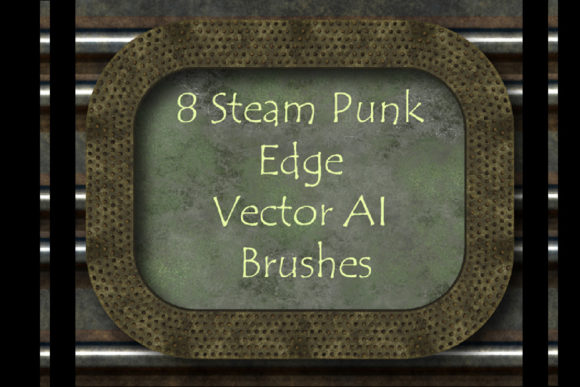
8 Steam Punk Illustrator Brushes
The aesthetic of steam power, brass gears, and industrial grit has never truly faded from the design landscape. It evolves, finding new life in digital art, game interfaces, and branding that seeks to convey durability and mechanical complexity. For designers working within Adobe Illustrator, achieving this look manually can be a tedious process of drawing individual rivets, rust patches, and metal plates. This is where specialized tools become indispensable. The 8 Steam Punk Illustrator Brushes collection offers a streamlined solution for creators who want to infuse their vector artwork with authentic, grunge-metal textures without sacrificing workflow efficiency.
This set is not merely a collection of static images; it is a dynamic toolkit designed to integrate seamlessly into your existing creative pipeline. By leveraging pattern brushes, you can transform simple paths into intricate, rusty clinch ribbons, friezes, and edging with a single click. The ability to modify color, size, and thickness on the fly means that these assets are not rigid templates but flexible components of your design language. Whether you are illustrating a Victorian-era airship or designing a modern techno-style logo, these brushes provide the foundational texture needed to ground your concepts in a tangible, mechanical reality.
Understanding the Toolkit’s Core Value
At its heart, this collection comprises eight distinct pattern brushes focused on rivet grunge and ferruginous borders. "Ferruginous" refers to the presence of iron, specifically in the form of rust, which is central to the steampunk visual identity. The inclusion of corner elements is a critical feature often overlooked in lesser brush sets. In vector design, maintaining consistent corners when creating frames or boxes is notoriously difficult. These brushes automatically adjust at 90-degree angles, ensuring that your riveted plates and metal strips look continuous and professionally constructed rather than patched together.
Compatibility is another significant advantage. The package includes original AI Illustrator 10 and EPS 10 files, making it accessible for users running older versions of the software, such as Illustrator CS5. This backward compatibility ensures that freelancers and studios with varied software setups can all utilize the same assets. Furthermore, the inclusion of a PDF help file with screenshots reduces the learning curve. Instead of guessing how to apply scale settings or adjust stroke profiles, users have a clear reference guide, allowing them to start creating immediately.
Creative Applications Across Industries
The versatility of these brushes extends far beyond traditional illustration. Different professionals can adapt these tools to meet specific project goals, enhancing both the visual appeal and the narrative depth of their work.
Game Design and Concept Art
For concept artists working on video games or tabletop RPGs, environment design requires rapid iteration. You might need to sketch out the interior of a submarine, the exterior of a factory, or the armor of a character. Using the 8 Steam Punk Illustrator Brushes, you can quickly block out structural elements. The riveted borders can define panel lines on a mech suit, while the grunge textures can suggest wear and tear on ancient machinery. Because the files are vector-based, they can be scaled infinitely without losing resolution, which is ideal for creating assets that need to be viewed at various zoom levels during the design phase.
Branding and Packaging
Marketers and small business owners often seek to differentiate their brands through distinctive visual identities. A craft brewery, a barber shop, or a boutique coffee roaster might adopt an industrial or vintage aesthetic to communicate quality and tradition. These brushes allow designers to create custom labels, packaging borders, and promotional materials that feel handcrafted yet precise. The ability to change the color of the brushes means you can match specific brand palettes—shifting from deep oxidized copper to bright polished brass—while retaining the underlying texture of the metal.
Digital Publishing and Editorial Design
Bloggers, publishers, and educators creating digital content can use these elements to break up text and add visual interest to articles or e-books. Chapter headers, section dividers, and pull quotes can be framed with these riveted edges, giving the publication a cohesive thematic style. For history blogs or science fiction anthologies, this adds an layer of immersion that standard geometric shapes cannot achieve. The grunge texture provides a tactile quality that makes digital screens feel more organic and engaging.
Mastering Customization and Workflow
To get the most out of these brushes, it is essential to understand how to manipulate them within Illustrator. While the presets are ready to use, true creativity comes from adaptation. The brushes are designed to be editable. If the default rust color does not fit your scene, you can expand the appearance and recolor the vector paths. If the rivets are too large for a delicate piece of jewelry design, you can adjust the stroke weight to scale them down proportionally.
One practical recommendation is to organize your swatches and brushes panels before beginning a complex project. Save variations of the brushes with different colors and widths as new library items. This creates a personal palette of industrial textures that you can drag and drop onto any path. For example, you might save a "Heavy Rust" version for background elements and a "Polished Steel" version for foreground highlights. This organization keeps your workflow efficient and ensures consistency across multiple artboards.
Additionally, consider combining these brushes with other effects. Applying a slight drop shadow or an inner glow can enhance the three-dimensional illusion of the rivets and plates. Since the brushes are vector-based, you can also use the Pathfinder tool to merge them with other shapes, creating custom mechanical components that are unique to your project. This level of control ensures that your work remains original and does not look like a generic template.
Technical Specifications and Usability
The technical foundation of this set supports professional standards. The ZIP archive, totaling 62 MB, contains high-quality data without being overly burdensome to download or store. The inclusion of EPS 10 files is particularly valuable for users who need to import these elements into other vector-based programs or share them with clients who may not use Illustrator. The pattern brushes are constructed to tile seamlessly, meaning you can stretch a path to any length without visible repetition artifacts—a common issue with lower-quality brush sets.
For those interested in expanding their skills, the provided files serve as an educational resource. By examining how the original brushes were constructed, you can learn the principles of creating your own pattern brushes in Illustrator. You can dissect the corner elements to understand how anchor points are configured to handle turns smoothly. This empowers you to eventually create bespoke brushes tailored to niche styles, whether that is cyberpunk, dieselpunk, or biopunk.
Final Thoughts on Industrial Aesthetics
In a digital world that often feels sterile and overly polished, the rough, tactile appeal of steampunk and industrial design offers a refreshing contrast. It reminds viewers of craftsmanship, weight, and history. The 8 Steam Punk Illustrator Brushes provide a practical bridge between this aesthetic desire and the technical demands of modern vector design. They save time, reduce repetitive tasks, and open up new avenues for creative expression.
Whether you are a seasoned illustrator looking to speed up your workflow or a hobbyist eager to experiment with a new style, this toolkit offers the flexibility and quality needed to produce professional results. By integrating these elements into your projects, you add a layer of depth and character that resonates with audiences. As with any creative tool, the value lies in how you use it. Experiment with the settings, combine the brushes with your own ideas, and let the mechanical beauty of these vectors inspire your next masterpiece. If you find these tools helpful in your creative journey, consider rating the product to support the developers and help other designers discover this resource.