Enhancing Winter Designs with 12 Snowflake Illustrator Brushes
As the holiday season approaches, graphic designers, illustrators, and digital artists often face the recurring challenge of creating fresh, engaging winter-themed visuals. While vector shapes are a staple in Adobe Illustrator workflows, manually placing and adjusting individual snowflakes can be time-consuming and often results in static, repetitive compositions. This is where specialized brush sets become invaluable tools for streamlining the creative process. The 12 Snowflake Illustrator Brushes package offers a targeted solution for professionals and hobbyists alike, providing a collection of scatter brushes designed to add depth, realism, and festive atmosphere to digital artwork.
This resource is not merely a collection of clipart; it is a functional toolset engineered to integrate seamlessly into existing Illustrator workflows. By leveraging the power of scatter brushes, users can generate endless variations of snow ribbons, friezes, and edging with minimal effort. For those looking to elevate their Christmas or New Year projects, understanding the technical capabilities and practical applications of these brushes is essential for maximizing their potential.
Technical Composition and Visual Quality
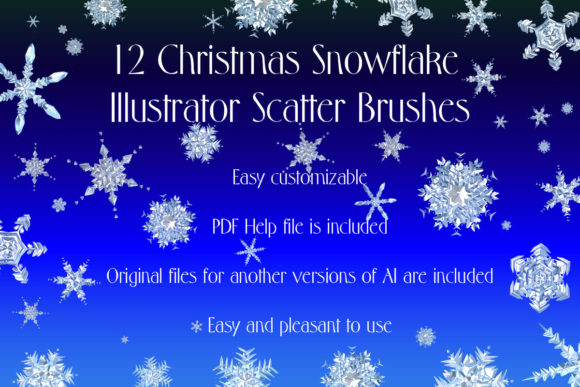
The core value of any digital asset lies in its construction and visual fidelity. The 12 Snowflake Illustrator Brushes set comprises twelve distinct scatter brushes, each meticulously crafted to simulate the natural complexity of falling snow. Unlike flat, two-dimensional icons, these brushes incorporate realistic shadows, volume, and brilliance. This attention to detail allows the snowflakes to appear three-dimensional, catching light and casting subtle shadows that ground them within the composition.
The color palette includes freezing white, soft gray, and icy blue tones. This variation is crucial for achieving a natural look, as snow in real-world conditions rarely appears as a uniform, stark white. The inclusion of gray and blue hues enables designers to create depth and atmospheric perspective, making background elements recede while foreground elements pop. Furthermore, the brushes are designed with transparency and blending modes in mind, allowing for seamless integration over various backgrounds without the need for extensive manual editing.
From a technical standpoint, the package is compatible with Adobe Illustrator CS5 and above, ensuring accessibility for a wide range of users, from those on older legacy systems to professionals using the latest Creative Cloud versions. The inclusion of both AI (Illustrator 10) and EPS 10 original files provides flexibility for users who may need to extract individual vector shapes for other design software or specific project requirements. This backward compatibility is a significant advantage, as it ensures the longevity and usability of the asset across different studio environments.
Workflow Efficiency and Customization
One of the primary advantages of using scatter brushes over static vectors is the ability to generate organic, non-repetitive patterns quickly. With the 12 Snowflake Illustrator Brushes, users can paint snow trails, borders, or dense blizzards with a single stroke. The scatter function randomizes the size, rotation, and spacing of the snowflakes, preventing the "stamped" look that often plagues manual placement methods. This randomness is key to creating believable natural phenomena.
However, the true strength of this toolset lies in its customizability. While the presets provide an excellent starting point, Adobe Illustrator’s brush engine allows for extensive modification. Users can easily adjust the color, size, thickness, and density of the brushes to suit specific project needs. For instance, a marketer creating a subtle holiday email header might reduce the opacity and size for a delicate dusting effect, while a poster designer might increase the scale and contrast for a bold, dramatic statement.
The package also includes a PDF help file with screenshots, which serves as a valuable resource for users unfamiliar with advanced brush settings. This documentation guides users through the installation process and offers tips on how to tweak brush dynamics. For experienced designers, this may seem unnecessary, but for freelancers, educators, or serious hobbyists who are still mastering Illustrator’s nuances, this support material significantly reduces the learning curve and enhances the overall user experience.
Practical Applications for Professionals and Creators
The versatility of the 12 Snowflake Illustrator Brushes makes them suitable for a wide array of professional applications. For marketers and small business owners, these brushes can expedite the creation of seasonal promotional materials, such as social media graphics, web banners, and print advertisements. The ability to quickly generate high-quality decorative elements allows for faster turnaround times during the busy holiday rush, enabling businesses to maintain a consistent and professional visual presence.
Freelance illustrators and graphic designers will find these brushes particularly useful for adding texture and atmosphere to larger compositions. Whether designing a Christmas card, a book cover, or a packaging label, the brushes can be used to create intricate borders, frame text, or add a subtle wintry ambiance to the background. The realistic shadows and volume help these elements blend naturally with other vector or raster assets, maintaining a cohesive visual style.
Educators and publishers can also benefit from this resource when creating educational materials or holiday-themed content. The clean, professional aesthetic of the snowflakes ensures that they remain appropriate for formal contexts while still conveying the festive spirit. Additionally, the scalability of vector brushes means that the artwork remains crisp and clear at any size, from small icons to large-format prints, ensuring high-quality output regardless of the medium.
Evaluating Usability and Long-Term Value
When evaluating digital assets, it is important to consider not just immediate utility but also long-term value. The 12 Snowflake Illustrator Brushes are stored in a compact ZIP archive of 9.04 MB, making them easy to download, store, and transfer. This small footprint is beneficial for users with limited storage space or those who manage large libraries of design resources.
The reliability of the brushes is another critical factor. Since they are built using native Illustrator brush technology, they perform consistently across different projects and system configurations. There are no plugins or external scripts required, reducing the risk of compatibility issues or software conflicts. This stability is essential for professional workflows where deadlines are tight and reliability is paramount.
However, users should be aware of certain limitations. As with any scatter brush, achieving the perfect distribution may require some experimentation with brush settings. While the presets are well-designed, they may not perfectly suit every artistic vision out of the box. Designers must be willing to engage with the Brush Options panel to fine-tune spacing, scatter, and rotation angles. For those unwilling to invest time in customization, the default settings may feel slightly generic. Nevertheless, the included help file mitigates this by providing clear guidance on how to achieve desired effects.
Who Should Consider This Resource?
The 12 Snowflake Illustrator Brushes are ideal for a diverse audience. Professional designers will appreciate the time-saving aspects and the high-quality vector foundation. Entrepreneurs and small business owners who handle their own marketing will find the ease of use and professional results appealing. Educators and bloggers can use these brushes to enhance visual content without needing advanced illustration skills. Even serious hobbyists looking to improve their digital art portfolio will find value in the realistic details and flexibility offered by the set.
In conclusion, this brush set represents a practical, efficient, and high-quality tool for anyone looking to incorporate winter themes into their Adobe Illustrator projects. By combining realistic visual details with the flexibility of vector brushes, it offers a superior alternative to manual snowflake placement. Whether used for subtle decoration or bold design statements, the 12 Snowflake Illustrator Brushes provide a reliable means to enhance seasonal artwork with professionalism and ease.