Evaluating Spooky Dots Halloween Brushes for Digital Illustration
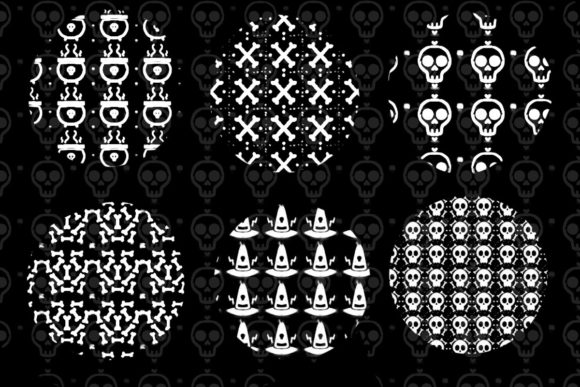
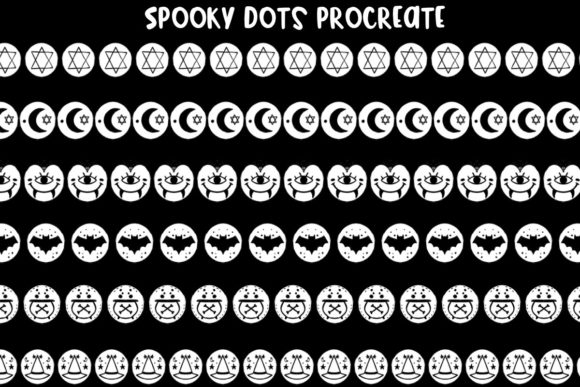
Halloween design projects often demand a specific aesthetic balance between whimsical charm and eerie atmosphere. For digital artists working within the Procreate ecosystem on iOS and iPadOS, finding assets that streamline this process without sacrificing quality is a constant pursuit. The Spooky Dots Halloween Brushes collection emerges as a targeted solution for creators looking to inject thematic elements into their work efficiently. This set moves beyond standard texture brushes, offering illustration-styled dots that incorporate iconic holiday motifs such as moons, stars, bats, and witch hats.
Understanding the utility of specialized brush sets requires looking past the initial visual appeal. The true value lies in how these tools integrate into a professional workflow, reduce repetitive manual drawing, and maintain consistency across complex compositions. This analysis explores the practical applications, technical specifications, and ideal use cases for this brush pack, helping designers determine if it aligns with their current project requirements.
Core Features and Design Philosophy
The Spooky Dots Halloween Brushes are built on a concept of modular decoration. Rather than providing full illustrations, the pack offers stamp-style brushes that function as building blocks. Each "dot" is a self-contained graphic element. This approach allows for rapid scene construction. The included motifs—moons, stars, bats, and witch hats—are rendered in a cohesive, professionally made illustration style. This consistency is crucial; mixing disparate art styles within a single piece can disrupt visual harmony, but these brushes share a unified line weight and aesthetic tone.
The files are delivered in the .brushset format, which is native to Procreate. This ensures seamless installation on both iPhone and iPad devices running iOS and iPadOS. The compatibility is straightforward, requiring no third-party software or conversion steps. For professionals managing multiple devices, this ease of transfer supports a flexible workflow, allowing artists to start a sketch on an iPhone during commute hours and refine it on an iPad later.
Versatility in Application
One of the standout characteristics of this collection is its flexibility. While marketed for Halloween, the underlying shapes possess a broader utility. Stars and moons, for instance, are perennial elements in night-sky illustrations, children’s book art, and celestial-themed designs. By framing them within a "spooky" context, the creator taps into seasonal demand, but the assets remain usable year-round for appropriate projects. The bat silhouettes and witch hats provide immediate thematic recognition, making them invaluable for time-sensitive marketing materials or social media content where quick turnaround is essential.
The brush engine in Procreate allows for significant customization. Users can adjust the size, opacity, and spacing of these dots. This means a single brush can create a dense cluster of bats for a background texture or scatter individual stars for a subtle accent. This adaptability enhances the long-term value of the purchase, as the tools do not become obsolete after October 31st.
Workflow Efficiency and Professional Utility
For freelancers, marketers, and small business owners, time is a direct cost. Manually drawing dozens of small, consistent icons like bats or stars is labor-intensive and prone to human error in terms of shape uniformity. Spooky Dots Halloween Brushes mitigate this by automating the repetition. A designer can lay down a base composition and then use these stamps to fill negative space, create borders, or add decorative flair with minimal effort.
Consider a scenario involving a local bakery promoting Halloween cupcakes. A social media graphic needs to be eye-catching but quick to produce. Using these brushes, the designer can overlay scattered witch hats and moons around the product photo. The result is a polished, themed asset that looks custom-made but was assembled in minutes. This efficiency is particularly beneficial for content creators who must maintain a high volume of output during peak seasonal periods.
Moreover, the professional quality of the illustration style ensures that the end product does not look like a generic clip-art assembly. The lines are clean, and the shapes are balanced. This level of polish is essential for brands aiming to maintain a premium image even when using pre-made assets. It bridges the gap between amateur DIY designs and high-end custom illustration.
Target Audience and Ideal Use Cases
While hobbyists will certainly appreciate the fun factor of Spooky Dots Halloween Brushes, the primary beneficiaries are likely professionals who need reliable, scalable assets. This includes:
- Graphic Designers and Illustrators: Those creating greeting cards, party invitations, or packaging designs can use these brushes to add intricate details without expanding project timelines.
- Social Media Managers: Creating engaging, themed posts for businesses during the Halloween season requires speed and visual impact. These brushes provide ready-made elements that enhance visual storytelling.
- Educators and Publishers: Teachers creating worksheets or publishers designing children’s books can utilize the friendly, non-threatening style of the bats and witches to engage younger audiences.
- Small Business Owners: Entrepreneurs handling their own marketing can achieve a professional look without needing advanced drawing skills.
The brushes are particularly effective in projects that require a playful or whimsical tone. They may be less suitable for horror-themed designs that rely on gritty, realistic, or disturbing imagery. The "illustration-styled" nature implies a certain lightness and approachability, which should be considered when matching the tool to the project’s emotional goal.
Technical Performance and Usability
Performance-wise, the .brushset file is lightweight, ensuring it does not bog down the Procreate application. On modern iPads, the response time is instantaneous. The brushes leverage Procreate’s native pressure sensitivity if configured, though as stamp brushes, they primarily rely on tap placement or drag spacing. This simplicity reduces the learning curve. There is no need to master complex brush settings; users can begin creating immediately after installation.
However, users should be aware of the limitations inherent to stamp brushes. Because they are pre-drawn shapes, they lack the organic variation of hand-drawn elements unless manually rotated or resized. To avoid a repetitive, patterned look, it is advisable to vary the scale and orientation of the stamps. Procreate’s transform tools make this easy, but it requires a conscious effort from the artist to maintain visual interest.
Another consideration is resolution. While vector-like clarity is maintained at most sizes, extreme enlargement may reveal pixelation depending on the original source resolution of the brush tip. For standard digital outputs such as web graphics, social media posts, and even print materials up to poster size, the quality is generally sufficient. Professionals working on large-format prints should test the brushes at their intended output size to ensure crisp edges.
Long-Term Value and Integration
Investing in niche brush sets like Spooky Dots Halloween Brushes is often viewed through the lens of seasonal utility. However, the modular nature of the components extends their lifespan. The star and moon elements, stripped of their strictly Halloween context, serve as versatile assets for any night-time or magical theme. The bat shapes, while strongly associated with Halloween, can also fit into gothic or nocturnal wildlife illustrations. This versatility improves the return on investment, transforming a seasonal purchase into a permanent addition to the digital toolkit.
Furthermore, the consistency of the style allows these brushes to be combined with other assets. They can serve as a foundational layer upon which more detailed illustrations are built. For example, an artist might use the witch hat stamps as a base pattern and then paint over them with additional textures and shadows to create a unique, hybrid look. This hybrid approach leverages the speed of the brush set while retaining the uniqueness of custom art.
Final Considerations for Buyers
Before purchasing, creators should assess their current library. If you already possess extensive collections of generic shape brushes, evaluate whether the specific stylistic nuance of this pack adds something new. The "professionally made illustration-styled" aspect is the key differentiator. If your existing assets are rough, sketchy, or overly realistic, this pack offers a clean, graphic alternative that may fill a gap in your resources.
Additionally, consider your primary output medium. If you work predominantly in vector-based software like Adobe Illustrator, these Procreate-specific brushes will not be directly compatible. They are designed exclusively for the raster-based environment of Procreate on iOS and iPadOS. For digital painters and illustrators within this ecosystem, however, they represent a low-risk, high-reward addition.
In conclusion, Spooky Dots Halloween Brushes offer a practical, efficient solution for adding thematic flair to digital designs. They balance ease of use with professional quality, making them suitable for a wide range of creators from serious hobbyists to marketing professionals. By understanding their strengths in workflow acceleration and their limitations in organic variation, users can effectively integrate them into their projects, ensuring both timely delivery and visually appealing results. For those seeking to enhance their Halloween-themed creations without compromising on professionalism, this collection warrants serious consideration.