Halloween Pattern Brushes: A Practical Guide for Digital Artists
Digital illustration has transformed how artists approach seasonal design, offering tools that streamline the creation of complex motifs. Among these tools, Halloween Pattern Brushes have emerged as a valuable resource for creators looking to produce thematic artwork efficiently. These specialized digital assets allow users to paint continuous, repeating designs with a single stroke, significantly reducing the time required to manually place individual elements. For designers working on holiday-themed projects, understanding the utility and limitations of these brushes is essential for making informed decisions about their workflow.
Understanding Halloween Pattern Brushes
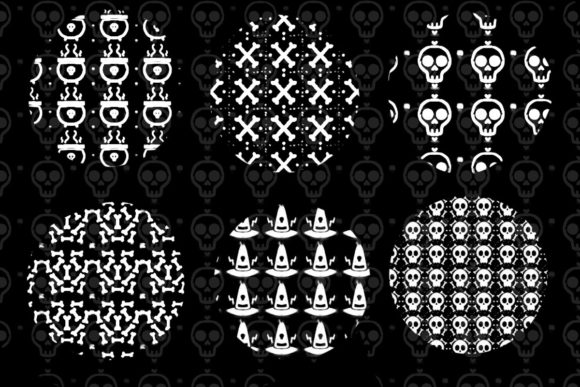
Halloween Pattern Brushes are pre-configured digital tools designed specifically for the Procreate application on iOS and iPadOS devices. Unlike standard round or flat brushes that apply uniform color or texture, pattern brushes stamp a sequence of images along the path of your stylus. The specific set discussed here includes six distinct patterns featuring iconic Halloween imagery: skeleton decorations, skulls, bones, cauldrons (often referred to as boilers in some contexts), and witch hats.
The technical foundation of these brushes lies in their ability to handle spacing, rotation, and scaling automatically. When a user draws a line, the brush engine repeats the designated graphic—such as a row of skulls or a trail of bones—maintaining consistent intervals. This functionality is particularly useful for creating borders, backgrounds, and decorative accents without the need for manual duplication and alignment of individual layers.
Why Consider Using Pattern Brushes?
The primary motivation for adopting Halloween Pattern Brushes is efficiency. Creating intricate patterns manually can be labor-intensive, requiring precise placement and adjustment of each element to ensure visual consistency. For professional designers or hobbyists working under tight deadlines, such as those preparing for the October holiday rush, these brushes offer a streamlined alternative.
Furthermore, these tools lower the barrier to entry for complex designs. An artist who may not feel confident drawing anatomically correct skeletons or perspective-accurate witch hats can still incorporate these elements into their work professionally. The brushes provide a standardized aesthetic, ensuring that the graphical elements remain cohesive throughout a project. This consistency is crucial for brand identity in commercial applications, such as merchandise or event branding.
Applications and Use Cases
The versatility of this brush set allows for application across various media and products. Understanding where these patterns fit best helps users maximize their value. Common use cases include:
- Apparel Design: The repeating nature of pattern brushes makes them ideal for t-shirt graphics. Designers can create all-over prints or localized chest patches featuring skeleton decorations or bone trails.
- Home Decor and Wall Art: Large-scale prints benefit from the seamless repetition of patterns. Users can generate background textures for posters, canvas prints, or framed wall art that evoke a spooky atmosphere without appearing cluttered.
- Packaging and Merchandise: Trick-or-treat bags, gift tags, and labels can be enhanced with thematic borders created using witch hat or cauldron patterns. This adds a professional touch to homemade or small-batch commercial products.
- Event Materials: Invitations, flyers, and social media graphics for Halloween parties can utilize these brushes to frame text or separate sections, providing a festive yet organized layout.
Benefits and Tradeoffs
When evaluating Halloween Pattern Brushes, it is important to weigh the advantages against potential limitations. The most significant benefit is speed. What might take hours to construct manually can be achieved in minutes. Additionally, the non-destructive nature of digital layers allows for easy experimentation. Users can adjust the opacity, blend modes, and color of the brush strokes after application, offering flexibility in the design process.
However, there are tradeoffs. The primary limitation is predictability. While pattern brushes are efficient, they can sometimes appear repetitive or mechanical if used excessively without variation. A long, unbroken line of identical skulls may look artificial compared to a hand-placed arrangement. To mitigate this, artists often need to go back and manually adjust specific elements, rotate individual stamps, or vary the pressure sensitivity to change the size of the pattern elements dynamically.
Another consideration is software dependency. These brushes are formatted as .brushset files, which means they are exclusively compatible with Procreate on iPadOS and iOS. Users who prefer desktop-based software like Adobe Photoshop or Illustrator cannot use these specific files directly. This locks the user into a specific ecosystem and hardware requirement, which may be a constraint for those who do not own an iPad.
Technical Requirements and Compatibility
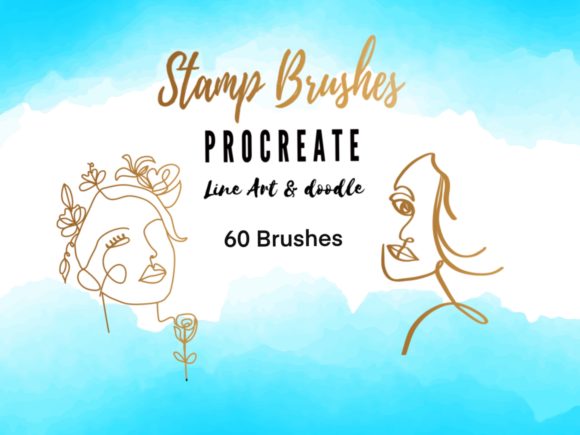
To utilize this specific set of Halloween pattern brushes, users must have the Procreate app installed on a compatible Apple device. The files included are in the .brushset format, which is native to Procreate. Installation is typically straightforward, involving importing the file directly into the app’s brush library.
It is crucial to note that these brushes will not function in other digital art programs unless converted, a process that often requires advanced technical knowledge and may result in loss of fidelity or functionality. Therefore, prospective users should ensure they are comfortable with the Procreate interface and have an Apple Pencil or compatible stylus for optimal control over pressure and tilt sensitivity.
Decision-Making Insights: Is This Set Right for You?
Determining whether to invest time in learning and using these Halloween Pattern Brushes depends on your specific project goals and workflow preferences. This tool is a strong fit if you are a Procreate user looking to scale up your Halloween-themed output without sacrificing quality. It is particularly beneficial for surface pattern designers, print-on-demand sellers, and social media content creators who need to produce high volumes of thematic graphics.
Conversely, alternatives may be worth considering if you require vector-based scalability for large-format printing, such as billboards or vehicle wraps. In such cases, vector software like Adobe Illustrator, using pattern swatches, might be more appropriate. Additionally, if you prefer complete artistic control over every individual element’s placement and orientation, manual composition may yield a more organic and unique result, albeit at the cost of time.
For those who decide to proceed, best practices suggest using these brushes as a foundational layer rather than a final product. Combining pattern strokes with hand-drawn elements, texture overlays, and typographic adjustments can help break up the repetition and create a more dynamic composition. By integrating these tools thoughtfully, artists can enhance their creative capabilities while maintaining a distinct personal style.
Conclusion
Halloween Pattern Brushes represent a practical solution for digital artists seeking efficiency and consistency in their seasonal projects. With features including skeleton decorations, skulls, bones, cauldrons, and witch hats, this set offers a range of thematic options suitable for t-shirts, wall art, packaging, and event materials. While the reliance on Procreate and the potential for repetitive visuals are factors to consider, the time-saving benefits and professional finish make these brushes a valuable addition to many digital workflows. By understanding both the capabilities and limitations of these tools, creators can make informed decisions that align with their artistic goals and technical requirements.