Mastering Hairstyle Vector Illustrator Brushes
Digital character design often hits a bottleneck at the hair. Skin tones are relatively straightforward to shade, and clothing can be constructed from geometric shapes or imported textures. But hair? Hair is chaotic. It involves thousands of individual strands, complex light reflection, and organic movement that defies rigid vector paths. For years, illustrators relied on tedious manual drawing or low-resolution raster overlays that pixelated when scaled. This is where Hairstyle Vector Illustrator Brushes change the workflow entirely.
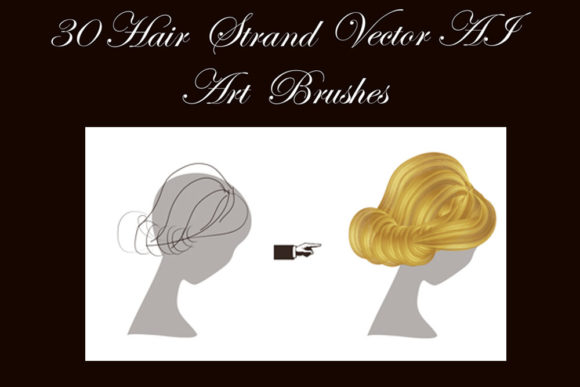
These specialized tools are not just simple stamps; they are dynamic, scalable assets designed to mimic the physics and aesthetics of real hair within Adobe Illustrator. By leveraging these brushes, creators can generate bright, shiny hairstyles with natural shadows, adjust the thickness of individual strands, and experiment with color palettes instantly. Whether you are designing a mascot for a startup, illustrating a children’s book, or creating assets for a mobile game, understanding how to utilize these vectors can significantly elevate the professional quality of your output.
The Mechanics of Vector Hair Creation
The primary advantage of using vector-based hair locks over raster images is scalability. A PNG file of a hairstyle will blur if you try to enlarge it for a billboard or shrink it for a favicon. Vector brushes, however, are mathematical paths. They remain crisp at any size. The Hairstyle Vector Illustrator Brushes collection typically includes original AI Illustrator 10 and EPS 10 files, ensuring compatibility with a wide range of software versions, including Illustrator CS5 and newer iterations.
What makes these brushes particularly powerful is their editability. Unlike a static clip-art image, each strand in a vector brush set can be manipulated. You can change the color, size, or thickness of each strand independently. This level of control allows for a high degree of customization. For instance, if a client requests a specific shade of auburn rather than standard brown, you can adjust the hex code globally or per strand without losing the texture’s integrity. The inclusion of shadows within the brush design adds depth, preventing the "flat" look that plagues many amateur vector illustrations.
Diverse Styles and Color Palettes
Versatility is key in professional design. A single brush style rarely fits every character archetype. A comprehensive set, such as the one featuring 30 art vector brushes, covers a broad spectrum of human diversity and creative fantasy. The inclusion of standard natural tones—blond, brunette, ginger, and brown—addresses the majority of realistic character design needs. However, the addition of dyed pink and green hair options opens doors for more expressive, stylized, or futuristic projects.
This variety is crucial for branding and storytelling. Consider a tech startup aiming for a youthful, disruptive image. Using vibrant, non-traditional hair colors in their illustrated team avatars can signal creativity and boldness. Conversely, a financial consultancy might prefer conservative, neatly styled brunette or blond locks to convey stability and professionalism. Having both options in a single library streamlines the asset creation process, allowing designers to pivot quickly between different brand voices without sourcing new tools.
Practical Applications Across Industries
The utility of Hairstyle Vector Illustrator Brushes extends far beyond hobbyist digital art. Here is how various professionals can integrate these tools into their workflows:
- Game Development: Indie game developers often work with limited resources. Creating unique character sprites from scratch is time-consuming. These brushes allow for rapid prototyping of character heads, ensuring visual consistency across different characters while maintaining distinct identities.
- Marketing and Advertising: Custom illustrations are trending in web design because they avoid the generic feel of stock photography. Marketers can create bespoke personas that match their target demographic precisely, adjusting hair styles to reflect current trends or specific cultural nuances.
- Educational Content: Educators and publishers creating materials for children benefit from friendly, approachable character designs. Soft, shiny hairstyles created with these brushes can make educational mascots more engaging and relatable to young audiences.
- Freelance Illustration: For freelancers, time is money. The ability to generate amazing braids or complex updos in minutes rather than hours directly impacts profitability. It allows artists to take on more clients or spend more time on other intricate details of a commission.
Efficiency and Workflow Optimization
One of the most significant benefits of this toolset is the reduction in production time. Drawing realistic braids manually requires a deep understanding of overlapping patterns and light sources. With pre-designed vector brushes, achieving amazing braids becomes a matter of selection and placement. The brushes are engineered to handle the complex interweaving of strands automatically, providing a polished look with minimal effort.
Furthermore, the inclusion of a PDF help file with screenshots ensures that even users who are not advanced Illustrator experts can get started quickly. This documentation bridges the gap between having the tool and knowing how to use it effectively. For those who prefer to customize their tools further, the package allows users to create their own brushes within their specific version of Illustrator. This flexibility ensures that the tool grows with the user’s skill level.
Technical Considerations and Compatibility
Before integrating any new asset library, technical compatibility is a primary concern. The Hairstyle Vector Illustrator Brushes are designed to be lightweight yet robust, with a ZIP archive size of only 15.6 MB. This small footprint means they download quickly and do not burden your system’s storage. More importantly, the inclusion of AI Illustrator 10 and EPS 10 original files guarantees backward compatibility. If you are working in an older environment like Illustrator CS5, or collaborating with a team using varied software versions, these formats ensure that the vectors remain editable and intact.
It is also worth noting the importance of file organization. When working with 30 different brushes, keeping your library organized is essential for maintaining productivity. Most modern versions of Illustrator allow you to save custom brush libraries, meaning you can load this specific set whenever you are working on character design projects, keeping your workspace clutter-free.
Enhancing Brand Identity Through Detail
In the digital age, attention to detail distinguishes premium brands from generic ones. Hair is a defining feature of identity. The way light hits a glossy brunette bob versus a matte pink pixie cut communicates different personalities. By using high-quality vector brushes that include shadow and highlight details, designers can inject subtle personality traits into their characters. This nuance enhances user engagement, as viewers subconsciously respond to the realism and care put into the design.
For entrepreneurs and business owners, this translates to better communication. An app interface with well-designed, diverse avatars feels more inclusive and polished. It suggests that the company values quality and understands its audience. The ease of changing colors and styles means that A/B testing different character looks for marketing campaigns is feasible without requiring a complete redesign.
Making the Right Choice for Your Toolkit
When evaluating whether to incorporate Hairstyle Vector Illustrator Brushes into your design stack, consider your current pain points. If you find yourself spending disproportionate amounts of time drawing hair, or if your current hair assets look flat and inconsistent, this tool offers a direct solution. The ability to easily adjust thickness and color means you are not locked into a single aesthetic. You can adapt the same base brush to create a corporate executive’s neat bun or a punk rocker’s spiked green mohawk.
Ultimately, the value lies in the balance between speed and quality. These brushes do not replace artistic skill; they amplify it. They handle the repetitive, technical aspects of hair rendering, freeing you to focus on composition, expression, and storytelling. For professionals looking to streamline their vector workflow without sacrificing visual fidelity, this collection represents a practical, high-impact investment. If you find these tools enhance your creative process, sharing your feedback and rating the product helps other creators discover reliable resources in a saturated market.