Mastering Realistic Damage: A Guide to Glass Bullet Hole Brushes and Vector Assets for Digital Art
In the realm of digital illustration and graphic design, realism is often the difference between a good composition and a truly immersive experience. Whether you are designing a gritty movie poster, creating assets for a video game, or adding dramatic flair to a photo manipulation project, the details matter. Among the most challenging textures to replicate manually are signs of impact, specifically glass bullet holes. Creating these from scratch requires a deep understanding of light refraction, fracture patterns, and material physics. However, modern designers have access to powerful tools that streamline this process. This article explores the utility, technical specifications, and creative applications of specialized brush sets and vector shapes designed to simulate glass damage with precision.
The Importance of High-Quality Texture Assets
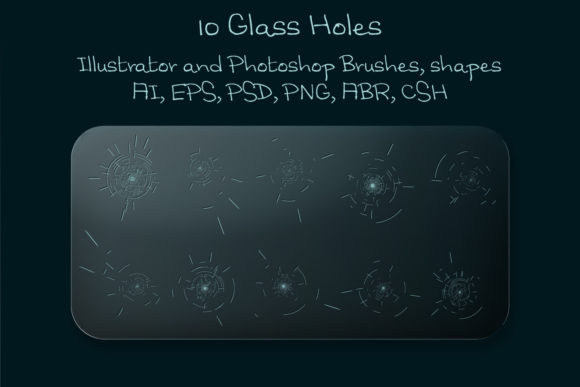
When an artist attempts to paint a bullet hole in glass using standard brushes, the result often lacks the chaotic organic nature of real shattered material. Real glass fractures in complex radial and concentric patterns. The edges catch light differently than the center, and the transparency varies across the break. Using pre-made assets, such as the 10 Glass Bullet Holes Brushes and corresponding vector shapes, allows creators to bypass the tedious manual rendering process. These tools are not just shortcuts; they are foundational elements that ensure consistency and professional quality in your artwork.
The significance of these assets extends beyond mere convenience. In commercial design, time is money. Being able to drag, drop, and customize a high-resolution bullet hole effect means you can iterate on designs faster. Furthermore, because these assets are built for scalability, they maintain their integrity regardless of the final output size. This is crucial for projects that may need to be scaled from a small web banner to a large-format print without losing sharpness or detail.
Understanding the File Formats and Compatibility
To fully leverage these resources, it is essential to understand the file types included in the package. A comprehensive set typically includes a variety of formats to ensure compatibility across different software ecosystems. Here is a breakdown of what you can expect from a professional-grade asset pack:
- Photoshop Brush File (.ABR): This file contains the glass hole brushes with a base size of 2000 px. These are raster-based stamps that allow for quick application of texture. They are ideal for photo bashing and digital painting where pixel-perfect placement is required.
- Photoshop Shape File (.CSH): Unlike standard brushes, shape files allow for non-destructive editing. You can resize these vector-based shapes infinitely without any loss of quality, making them perfect for clean, crisp edges in UI design or print media.
- Layered PSD File: This provides a pre-composed example of how the layers interact. It serves as an excellent learning tool, showing how highlights, shadows, and cracks are separated for maximum control.
- Transparent PNG File: A large, high-resolution image with a transparent background. This is universally compatible and can be dragged into almost any design software, from Canva to PowerPoint, making it accessible for non-professionals as well.
- Vector Files (EPS 10 and AI Illustrator 10): These are the crown jewels for scalability. Vector graphics use mathematical equations rather than pixels, meaning you can scale a bullet hole to the size of a billboard, and it will remain perfectly sharp. The EPS 10 format ensures compatibility with older software versions, while the AI file is native to Adobe Illustrator.
- Illustrator Brush File: This allows for dynamic stroke application within Illustrator, enabling users to draw crack lines that automatically adopt the texture of shattered glass.
The entire collection is usually compressed into a ZIP archive of approximately 22.3 MB. This compact size makes it easy to store and transfer, yet it holds a wealth of high-fidelity data. Compatibility is generally broad, supporting Photoshop CS3 and above, which covers nearly all modern creative workflows.
Practical Applications in Modern Design
The versatility of glass bullet hole assets means they fit into numerous creative industries. Let’s explore how these tools are used in real-world scenarios.
- Game Development and Concept Art: Environment artists often need to depict battle-worn scenes. Instead of modeling every shard of glass in 3D software, which can be computationally expensive, designers use 2D overlays. By scattering the 10 Glass Bullet Holes across a window texture, they can create the illusion of depth and damage efficiently.
- Motion Graphics and Video Editing: When compositing video footage, adding realistic damage to screens or mirrors enhances the narrative. Using the transparent PNGs or layered PSDs, editors can overlay bullet holes on top of footage, adjusting the blending modes to match the lighting of the scene.
- Advertising and Print Media: For edgy marketing campaigns, such as those for action movies or security systems, high-impact visuals are key. Vector EPS files allow printers to reproduce these images at any size without pixelation, ensuring the final print looks crisp and professional.
Customization: Color, Size, and Arrangement
One of the primary advantages of using digital assets over static images is the ability to customize. A common misconception is that pre-made brushes limit creativity. In reality, they offer a flexible starting point. With the provided Photoshop and Illustrator files, you can easily adjust the size and color of the bullet holes.
For instance, if you are designing a scene set at night with neon lighting, you might tint the glass shards blue or purple to reflect the ambient light. Because the assets are layered or vector-based, you can apply adjustment layers or change fill colors without affecting the underlying structure. Additionally, the "scattered" nature of the brushes allows for natural-looking arrangements. Real bullet impacts rarely look perfect; they have debris and irregular cracks. By rotating, scaling, and opacity-masking individual instances, you can create a unique pattern that feels organic rather than repetitive.
Best Practices for Using Glass Damage Assets
To get the most out of these tools, consider the following best practices. First, always pay attention to the light source in your composition. Glass is reflective and refractive. If your light comes from the left, the highlights on the bullet hole should align with that direction. Second, consider the type of glass. A car windshield shatters differently than a office window. While the brushes provide a general aesthetic, you may need to tweak the opacity or add additional noise to match the specific material context.
Furthermore, do not rely solely on the brush stamp. Combine the vector shapes with manual drawing. Use the AI brush to extend crack lines beyond the main impact zone. This hybrid approach—using automated assets for the core impact and manual touches for the surrounding stress fractures—yields the most convincing results.
Conclusion
Incorporating realistic damage effects like glass bullet holes can significantly elevate the visual storytelling of your projects. By utilizing a comprehensive pack that includes 10 Glass Bullet Holes Brushes, vector shapes, and HD textures, designers can save time while achieving professional-grade results. The inclusion of multiple file formats—from .ABR and .CSH for Photoshop to .EPS and .AI for Illustrator—ensures that these assets are versatile enough for any workflow. Whether you are a beginner looking to enhance your photo manipulations or an experienced artist streamlining your production pipeline, understanding how to effectively use these tools is an invaluable skill. Remember, the goal is not just to place a hole in the glass, but to integrate it seamlessly into the lighting, color, and narrative of your artwork. With the right resources and a keen eye for detail, you can create compelling, high-impact visuals that resonate with your audience.