Mastering Watercolor Brushes for Photoshop
Digital art often struggles to capture the organic unpredictability of traditional media. We spend hours perfecting lines and gradients, yet the result can feel sterile or overly polished. This is where Watercolor Brushes for Photoshop changes the game. By integrating 34 hand-painted textures turned into functional digital tools, this collection bridges the gap between the tactile warmth of paper and pigment and the efficiency of modern software. It is not just about adding a filter; it is about embedding the soul of watercolor into your workflow.
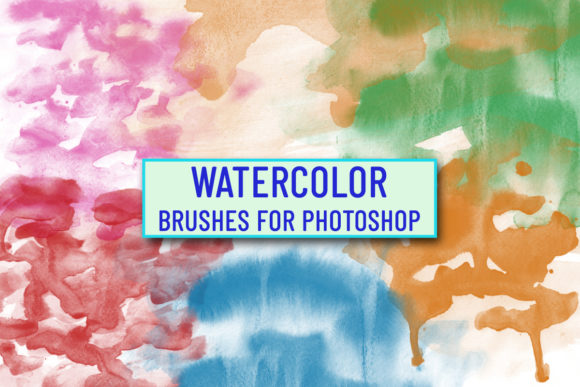
For designers, illustrators, and content creators, these brushes offer a shortcut to authenticity. Instead of manually painting every splatter and bleed, you have immediate access to high-resolution, realistic textures that respond to pressure and movement. The visual characteristics are distinct: soft edges, natural granulation, and varying opacity that mimics how water interacts with cold-press paper. This personality adds a layer of human touch to digital projects, making them feel curated rather than generated.
The Visual Appeal and Creative Potential
The core strength of this set lies in its diversity. With 34 unique ABR file brushes, you are not limited to a single stroke style. Some brushes offer broad, sweeping washes ideal for backgrounds, while others provide sharp, detailed tips for intricate linework. You can see the size of every brush in the preview images, allowing you to assess their potential before installation. This transparency is crucial for professionals who need to know if a specific tool fits their current project’s scale and resolution requirements.
These assets function as more than just painting tools; they are essential design assets for building a cohesive brand identity. In an era where minimalism often dominates, introducing watercolor elements can soften a brand’s image, making it approachable and artisanal. Whether you are working on packaging design for organic products or creating social media graphics for a lifestyle blog, the fluid nature of these brushes adds emotional resonance. They evoke feelings of calm, creativity, and craftsmanship, which can significantly influence audience engagement.
Consider the application in editorial design. A magazine spread or a digital ebook can benefit from watercolor accents that break up text blocks without overwhelming the reader. The irregular edges of the brush strokes create natural white space, guiding the eye through the layout. This is particularly effective when paired with clean, structured typography. The contrast between the chaotic beauty of watercolor and the order of grid-based design creates a dynamic visual hierarchy that keeps the viewer interested.
Practical Applications Across Industries
The versatility of Watercolor Brushes for Photoshop extends across various professional fields. For entrepreneurs and small business owners, these brushes are invaluable for creating unique marketing materials. Imagine designing a wedding invitation suite or a boutique hotel’s promotional brochure. The hand-painted look suggests exclusivity and attention to detail, qualities that premium clients often seek. Unlike generic stock vectors, these brushes allow for custom compositions that cannot be replicated exactly, ensuring your work stands out.
In the realm of web design, watercolor elements can serve as subtle background textures or hero section accents. They add depth to flat design interfaces without compromising load times, provided the assets are optimized correctly. For bloggers and publishers, using these textures in header images or post separators can enhance the aesthetic appeal of their content, encouraging longer read times and higher shareability on social platforms.
Furthermore, these brushes are excellent for logo design when a brand aims for a handmade or artistic vibe. While a logo needs to be scalable and simple, incorporating a watercolor splash as a background element or a subtle texture within the icon can add character. However, it is essential to use these elements judiciously. Overuse can clutter the design and reduce legibility. The key is balance—using the brushes to complement the core message rather than distract from it.
Installation and Workflow Integration
Getting started with this collection is straightforward, designed to minimize friction in your creative process. The files included are 34 ABR file brushes, the standard format for Adobe Photoshop. To install them, simply unzip the downloaded package. You can then click twice on the WatercolorBrushes.abr file, which will automatically launch Photoshop and load the presets. Alternatively, you can drag and drop the file directly into your Photoshop workspace.
For those who prefer manual management, open the Brush Presets panel, click on the menu icon, and select "Import Brushes" or use the Preset Manager to load the ABR file. Once installed, go to Windows > Brush or Brush Presets to find your new tools. Within the Brush settings, you can further customize the properties. Adjusting spacing, scattering, and texture dynamics allows you to tailor each brush to your specific needs. This level of control ensures that the brushes remain flexible enough for both broad conceptual sketches and fine-detail finishing touches.
Understanding how to manipulate these brushes is part of mastering them. Experiment with opacity flow and pressure sensitivity if you are using a graphics tablet. Lowering the opacity can create delicate glazes, while increasing it produces bold, saturated statements. The ability to tweak these parameters means you are not stuck with a one-size-fits-all solution. You can adapt the brushes to match the tone of any project, from whimsical and light to dramatic and intense.
Choosing the Right Tools for Your Project
When evaluating whether Watercolor Brushes for Photoshop are right for your next assignment, consider the overall aesthetic goal. If your project requires a clean, corporate look, these brushes might serve better as subtle accents rather than primary elements. However, for creative industries, hospitality, wellness, and arts, they are nearly indispensable. Always test font pairings when combining these textures with typography. A handwritten or script font often complements watercolor well, reinforcing the handmade feel. Conversely, a modern sans serif font can provide a striking contrast, grounding the ethereal quality of the paint.
Readability is another critical factor. Ensure that watercolor backgrounds do not interfere with text legibility. Use solid color overlays or adjust the brush opacity to maintain sufficient contrast. Professionalism in digital design is not just about technical skill but also about knowing when to restrain oneself. These brushes are powerful, but their impact is greatest when used with intention.
Finally, always review licensing terms for commercial use. While these brushes are designed for professional application, confirming that they fit your client’s needs regarding redistribution and end-product usage is a best practice. By integrating these high-quality, hand-painted textures into your toolkit, you elevate your design capabilities, offering clients a unique blend of traditional artistry and digital precision. This combination is what defines modern, impactful creative work.