Procreate Wooden Strokes & Stamps Guide
Digital art has evolved rapidly, moving from complex software requiring years of training to intuitive apps that empower creators of all skill levels. At the heart of this revolution is Procreate, a powerful tool for iPad users that mimics the feel of traditional media. However, even the best digital canvas can feel empty without the right tools to populate it. This is where specialized assets like Procreate Brushes Wooden Strokes Stamps come into play. These resources bridge the gap between hand-drawn authenticity and digital efficiency, offering a unique aesthetic that is both organic and versatile.
For designers, hobbyists, and small business owners, finding elements that look handmade rather than computer-generated is a constant challenge. Standard digital shapes often appear too perfect, lacking the warmth and texture of real-world materials. Wooden stroke stamps solve this problem by providing pre-designed, textured elements that replicate the look of wood grain, rustic lines, and boho-style doodles. By integrating these into your workflow, you can elevate simple compositions into rich, tactile designs without spending hours drawing each element from scratch.
Understanding the Value of Rustic Digital Assets
The appeal of Procreate Brushes Wooden Strokes Stamps lies in their ability to add immediate character to a project. In graphic design, texture is crucial for creating depth and interest. A flat color background can feel sterile, but overlaying a wooden stroke or a rustic border introduces visual complexity. These stamps are designed with transparent backgrounds, which is a critical feature for seamless integration. This transparency allows you to layer the strokes over photos, patterns, or solid colors, letting the underlying textures show through or blending them with your own color palettes.
Unlike standard brushes that require you to draw every line manually, stamp brushes work differently. They are essentially pre-made shapes that you place on the canvas with a single tap. This distinction is vital for efficiency. If you are designing a wedding invitation suite or a set of social media posts, consistency is key. Drawing a perfect wooden frame by hand for twenty different images is time-consuming and prone to variation. Using a stamp ensures that every instance looks identical, maintaining brand consistency while saving valuable production time.
Practical Applications for Creators and Entrepreneurs
The versatility of these digital assets extends far beyond simple illustrations. For small business owners and entrepreneurs, branding is everything. You can use these wooden strokes to create unique logos, packaging designs, or business cards that convey a sense of craftsmanship and earthiness. The "boho" or bohemian style, characterized by free-spirited and natural elements, is particularly popular in industries like wellness, organic products, and handmade goods. Incorporating wooden textures aligns perfectly with these brand identities.
Educators and planners also benefit significantly from these tools. Digital planning has become a massive trend, with users customizing their daily schedules on iPads. Adding rustic dividers, headers, or decorative corners to a digital planner makes the experience more engaging and personalized. Similarly, teachers creating worksheets or classroom decorations can use these stamps to add a warm, inviting feel to educational materials, making them less intimidating and more approachable for students.
Consider the world of print-on-demand. Designers creating T-shirts, tote bags, or vinyl decals need high-quality graphics that scale well. Since these stamps are vector-like in their clarity within Procreate, they can be used to create bold, standout designs for apparel. A simple wooden arrow or frame can serve as the centerpiece for a motivational quote on a shirt, appealing to customers who love nature-inspired aesthetics.
How to Use Wooden Stroke Stamps Effectively
Getting started with Procreate Brushes Wooden Strokes Stamps is straightforward, but understanding the mechanics ensures the best results. The process begins with downloading the instant digital file, which typically comes in a ZIP format. You will need a program on your iPad or computer to unzip this file. Once extracted, you will find the brush set file, along with instructions and a ReadMe file. It is essential to read these instructions, as they guide you through importing the brushes into the Procreate app correctly.
Once imported, using the stamps is intuitive. Select the brush from your library, choose the specific wooden stroke or shape you want, and simply tap the screen. Unlike regular painting brushes, you do not need to drag the Apple Pencil across the screen. A single tap places the stamp. You can then use Procreate’s transform tools to resize, rotate, or move the element to fit your composition. This ease of use makes it accessible for beginners who may not yet have advanced drawing skills.
To maximize the potential of these stamps, experiment with layer modes. Changing a layer from "Normal" to "Multiply" or "Overlay" can blend the wooden texture with the background in interesting ways. You can also adjust the opacity to make the strokes subtler, allowing them to act as a watermark or a gentle background element rather than a dominant feature. Combining multiple stamps can create intricate borders or frames, giving your designs a professional, curated look.
Important Technical Considerations
Before purchasing or downloading any digital brush set, it is crucial to understand the technical requirements. Procreate Brushes Wooden Strokes Stamps are specifically designed for the Procreate app on iPad. They are not compatible with Photoshop, Clip Studio Paint, or other desktop-based software. This limitation is due to the unique file format Procreate uses for its brushes. Therefore, you must have an iPad capable of running Procreate, along with an Apple Pencil or a compatible pressure-sensitive stylus.
While the stamps themselves are placed with a tap, having a pressure-sensitive stylus enhances the overall Procreate experience, allowing you to edit and refine your designs with precision. Additionally, ensure you have a reliable method for managing ZIP files on your device. Many users find it easier to unzip the file on a computer and then AirDrop it to their iPad, but various file management apps on iOS can handle this task directly if preferred.
Another consideration is the resolution of your final output. If you are creating designs for large-format prints, such as posters or banners, ensure your Procreate canvas is set to a high DPI (dots per inch), typically 300 DPI or higher. This ensures that the wooden textures remain crisp and detailed when printed, avoiding pixelation or blurriness.
Enhancing Creativity Without Limits
Ultimately, the goal of using tools like Procreate Brushes Wooden Strokes Stamps is to remove technical barriers and let creativity flow. By providing ready-made, high-quality elements, these brushes allow you to focus on composition, color theory, and messaging rather than getting bogged down in the minutiae of drawing every line. Whether you are scrapbooking memories, designing a new product line, or simply exploring digital art as a hobby, these assets offer a pathway to professional-looking results.
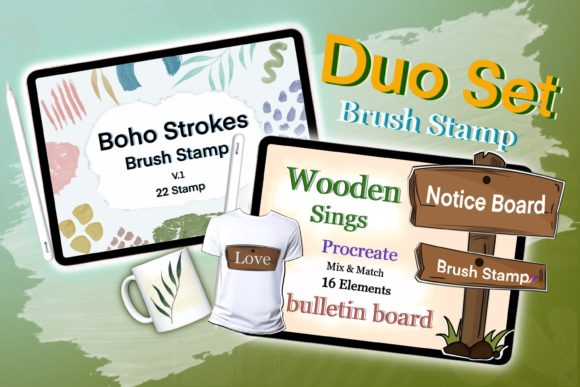
The inclusion of multiple sets, such as a 16-stamp set and a 22-stamp set, provides a wide variety of shapes and styles. This diversity ensures that you won’t run out of options as your projects grow. From simple lines to complex doodles, the range supports various design needs. As you become more familiar with the tools, you will discover new ways to combine them, layer them, and modify them, turning a simple digital download into a cornerstone of your creative toolkit.
In a digital landscape saturated with generic templates, adding a touch of rustic, handmade charm can make your work stand out. These wooden strokes and stamps are more than just digital files; they are instruments of expression that help you convey warmth, authenticity, and style. By integrating them into your workflow, you unlock new possibilities for personal and commercial projects, ensuring that your digital creations resonate with the same impact as traditional handcrafted art.