Spiderweb Flourish Illustrator Brushes
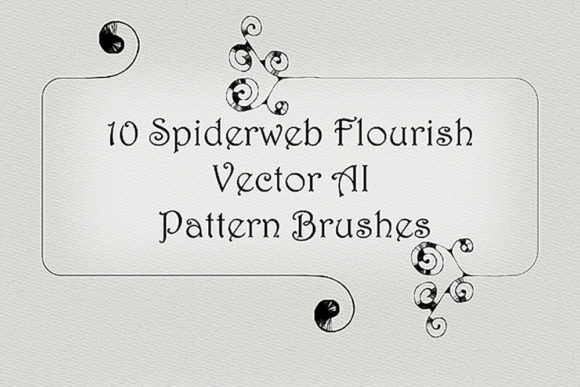
Design is often about finding the balance between structure and chaos. In digital illustration, few tools offer this duality as effectively as decorative vector brushes. Among these, Spiderweb Flourish Illustrator Brushes stand out for their ability to inject immediate whimsy and intricate detail into otherwise flat compositions. These are not merely static clip-art elements; they are dynamic, scalable tools that allow designers to weave openwork patterns directly into their workflow. Whether you are crafting a Halloween invitation, designing a gothic logo, or adding texture to a fantasy book cover, these twirl fanciful vector Adobe Illustrator brushes provide a versatile foundation for creative expression.
The Appeal of Openwork Flourishes
The primary advantage of using spiderweb-inspired flourishes lies in their structural complexity. Unlike solid shapes, openwork designs rely on negative space. This makes them exceptionally lightweight visually, allowing them to overlay photographs, text, or solid color blocks without overwhelming the underlying content. The "cobweb" aesthetic evokes a sense of age, mystery, and delicate craftsmanship. When applied correctly, these elements do not just decorate; they contextualize.
For marketers and small business owners, this translates to brand storytelling. A bakery specializing in rustic, artisanal goods might use subtle, web-like curls to frame a menu, suggesting handcrafted care. Conversely, a tech startup launching a cybersecurity product could utilize the geometric precision of a spiderweb to symbolize network connectivity and protection. The interpretation is flexible, but the visual impact remains consistent: these brushes add a layer of sophistication that standard lines cannot achieve.
Technical Versatility and Compatibility
One of the most practical aspects of this specific brush set is its technical accessibility. Compatible with Illustrator CS5 through modern Creative Cloud versions, the package includes original Ai Illustrator 10 and EPS 10 files. This backward compatibility is crucial for freelancers and agencies who may need to collaborate with clients using older software standards. The inclusion of a PDF help file with screenshots ensures that even users new to custom brush creation can integrate these tools seamlessly.
The collection features ten distinct pattern vector brushes, each offering unique fancy spiderweb curls. Because they are vector-based, scalability is limitless. You can stretch a tiny corner flourish to span an entire billboard without losing resolution or encountering pixelation. Furthermore, the ability to modify color, size, and thickness in real-time allows for rapid iteration. A designer can test a thin, silver web against a dark background, then instantly switch to a thick, gold variant for a luxury feel, all within seconds.
Creative Applications Across Industries
The utility of Spiderweb Flourish Illustrator Brushes extends far beyond seasonal Halloween graphics. Here is how different professionals can adapt these tools for varied goals:
- Publishers and Editors: Use the vignettes to create chapter headers or drop-cap frames in novels, particularly in the fantasy, mystery, or historical fiction genres. The openwork nature ensures text remains legible while the page feels ornately designed.
- Wedding and Event Planners: While "spiderweb" might sound spooky, the underlying geometry is similar to lace. By softening the colors to pastels or whites and reducing the opacity, these brushes can mimic intricate lace doilies for invitation suites, table cards, and menu designs.
- Educators and Content Creators: Teachers creating materials for literature units on Gothic fiction or arachnids can use these brushes to create engaging worksheets and presentation backgrounds that capture student interest without appearing cluttered.
- Fashion and Textile Designers: The repeating patterns can be exported and used as surface design elements for fabrics, wallpapers, or packaging papers. The vector format allows for easy recoloring to match seasonal palettes.
Mastering the Whimsy Style
To truly leverage the potential of twirl fanciful vector brushes, one must understand how to control their organic feel. Spiderwebs are naturally irregular. If your design looks too perfect, it loses its charm. Here are practical recommendations for maintaining a natural, whimsical aesthetic:
- Vary the Stroke Weight: Do not apply the same thickness to every element. Use thicker strokes for primary structural lines and thinner strokes for the delicate connecting threads. This creates depth and mimics the way light interacts with real silk.
- Play with Opacity: Real webs are translucent. Lowering the opacity of your brush strokes to 70-80% can help them blend more naturally with backgrounds, creating a ghostly, ethereal effect rather than a stark, graphic one.
- Combine with Texture: Vector art is clean by default. To ground the whimsy, consider placing your vector webs over a textured paper or grunge background. This contrast between the crisp vector lines and the rough background adds tactile realism.
- Customize the Brush Profile: Since the package allows you to make any brush for yourself in your Illustrator version, experiment with altering the pressure profiles. This can give the ends of the curls a tapered, hand-drawn look, enhancing the organic feel.
Organization and Workflow Efficiency
For professional designers, time is a critical resource. The ZIP archive for this set is a compact 3.59 MB, making it easy to store, share, and back up. However, integrating new assets into an existing library requires discipline. To keep results clear and organized, consider creating a dedicated "Flourishes" layer in your Illustrator documents. Lock this layer when working on primary content to prevent accidental selection or movement of the delicate web structures.
Consistency is key when using decorative elements across multiple pages or assets. Establish a style guide for your project that defines the maximum and minimum sizes for these flourishes, as well as a approved color palette. This ensures that whether you are designing a business card or a website banner, the spiderweb elements feel like part of a cohesive brand identity rather than random additions.
Expanding Your Creative Toolkit
The value of Spiderweb Flourish Illustrator Brushes lies not just in what they are, but in what they enable. They lower the barrier to entry for creating complex, hand-drawn-style illustrations. For hobbyists and entrepreneurs without advanced drawing skills, these brushes provide a shortcut to professional-looking results. For seasoned illustrators, they serve as a time-saving base that can be further customized and manipulated.
It is important to remember that these tools are meant to enhance, not replace, thoughtful design. Use them to guide the viewer’s eye, frame important information, or add emotional resonance to a piece. When used sparingly and with intention, these openwork flourishes transform simple layouts into captivating visual experiences.
If you find these tools useful in your creative process, consider rating the product. Feedback helps developers refine their offerings and ensures that high-quality resources remain available to the design community. Thank you for exploring the possibilities of whimsical vector art.