Evaluating Shells PNG 16 Photoshop HD Brushes for Nautical Design
In the realm of digital illustration and graphic design, the authenticity of texture often separates a competent composition from a truly immersive one. For designers working within marine, coastal, or tropical themes, finding high-quality assets that do not look like repetitive clipart can be a significant challenge. This is where specialized toolsets like Shells PNG 16 Photoshop HD Brushes enter the workflow. This resource combines the flexibility of custom brush engines with the static precision of high-resolution raster images, offering a dual approach to incorporating seashell elements into professional artwork.
The package is relatively compact in terms of file count but substantial in data weight, totaling approximately 103 MB in a ZIP archive. It includes one Photoshop brush file (.ABR) and two large transparent PNG files. Understanding how these components function individually and together is essential for determining whether this asset pack aligns with your specific project requirements, whether you are a freelance illustrator, a marketing designer, or a serious hobbyist.
Technical Specifications and Compatibility
Before integrating any new asset into a professional pipeline, technical compatibility is the primary concern. The Shells PNG 16 Photoshop HD Brushes are designed for Adobe Photoshop CS3 and above. This broad compatibility is a notable strength, ensuring that users with older, stable versions of the software are not excluded, while still functioning seamlessly in the latest Creative Cloud releases.
The core of the dynamic functionality lies in the .ABR file. The brushes are rendered at a resolution of approximately 2000x2000 pixels. In the context of digital painting, this size is significant. It allows for substantial scaling without immediate pixelation, providing enough detail for mid-range compositions. However, the true high-definition value comes from the included PNG files. These two files are massive, measuring 7000x5000 pixels each. This resolution is critical for print work, large-format displays, or detailed close-ups where edge clarity is paramount.
The total download size of 103 MB indicates that these are not heavily compressed, low-quality placeholders. The file weight suggests rich data retention, preserving the subtle gradients, shadows, and textures inherent in natural seashells. For professionals managing storage and bandwidth, this is a reasonable trade-off for the quality provided.
The Dual-Asset Approach: Brushes vs. PNGs
What makes this particular collection interesting is its hybrid nature. Most asset packs offer either brushes or static images, rarely both in such high fidelity. Understanding the distinct utility of each format helps maximize the value of the purchase.
Dynamic Application with .ABR Brushes
The sixteen Photoshop brushes allow for organic placement. When working on a complex scene, such as a beach landscape or a nautical background, manually placing individual shell images can be time-consuming and may result in a stiff, unnatural arrangement. Brushes enable the artist to "paint" shells onto the canvas. This method allows for rapid iteration, varying opacity, flow, and size dynamics to create depth and randomness.
With a base resolution of 2000x2000, these brushes are suitable for standard web graphics, social media content, and moderate-sized prints. They excel in scenarios where shells are part of a larger texture or background element rather than the sole focal point. The ability to rotate and adjust the angle of the brush stamp further enhances the realism, preventing the repetitive patterns that often plague lower-quality brush sets.
Precision and Detail with High-Res PNGs
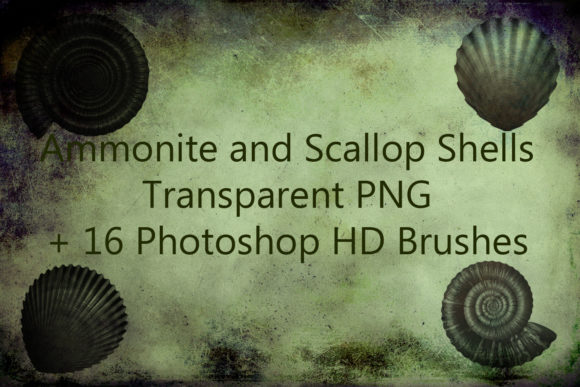
The two included PNG files serve a different purpose. At 7000x5000 pixels, these are essentially digital photographs or high-end scans of conches and other sea shells, isolated on transparent backgrounds. These are ideal for foreground elements where every ridge, color variation, and shadow must be crisp.
For example, if you are designing a luxury spa brochure or a high-end seafood restaurant menu, you might need a single, perfect conch shell as a central visual anchor. Using a brush for this might result in soft edges or insufficient detail. The PNGs allow for non-destructive editing, color grading, and precise positioning using Photoshop’s transform tools. They provide the "amazing nautical details" mentioned in the product description, serving as the hero assets in a composition.
Practical Applications in Professional Workflows
The versatility of Shells PNG 16 Photoshop HD Brushes makes them applicable across several industries. For marketers and small business owners in the tourism or hospitality sectors, these assets can elevate promotional materials. A travel agency creating brochures for coastal destinations can use the PNGs for striking cover images and the brushes to add subtle decorative borders or background textures.
Freelance illustrators and concept artists will find value in the speed these tools provide. When creating environment art for games or films involving underwater or beach scenes, these brushes can quickly block in secondary details, allowing the artist to focus on lighting and composition. The transparency of the PNGs ensures easy integration into existing layers without tedious masking.
Educators and bloggers focusing on marine biology or environmental conservation can also benefit. The high resolution allows for clear, detailed visuals in educational materials, presentations, or website headers. The realistic appearance helps maintain scientific accuracy while still being aesthetically pleasing.
Quality Assessment and Usability
From a usability standpoint, the installation process is straightforward. Importing the .ABR file into Photoshop’s brush panel is a standard procedure, and the PNGs can be dragged and dropped directly into any project. The transparency in the PNG files appears clean, with no harsh halos or jagged edges, which is a common issue in lower-quality cutouts. This cleanliness saves time in post-processing, as designers do not need to spend minutes refining masks.
The visual quality of the shells themselves reflects a good understanding of natural light and texture. The conches and other shells exhibit realistic color gradients, from deep oranges to pale creams, with accurate shadowing that gives them volume. This level of detail contributes to the overall professionalism of the final artwork. When combined, the brushes and PNGs allow for a layered approach: using the PNGs for key focal points and the brushes to scatter smaller shells around them, creating a cohesive and natural-looking scene.
Limitations and Considerations
While the resource is robust, it is important to acknowledge its limitations. The variety is limited to sixteen unique shapes. For projects requiring a vast diversity of shell species, this pack may need to be supplemented with additional resources. Furthermore, the .ABR brushes, while high quality at 2000x2000, may not hold up under extreme magnification for very large format printing compared to the 7000x5000 PNGs. Users should plan their workflow accordingly, reserving the PNGs for the most critical visual elements.
Additionally, the file size of 103 MB may be a consideration for users with limited storage or slower internet connections, although this is increasingly less of an issue in modern professional environments. The compatibility with PS3 and above is a plus for legacy users, but those using alternative software like Procreate, Affinity Photo, or Clip Studio Paint will need to convert the .ABR file or rely solely on the PNGs, which limits the dynamic utility of the pack for non-Photoshop users.
Final Verdict on Value and Integration
The Shells PNG 16 Photoshop HD Brushes represent a focused, high-quality toolset for specific design needs. They are not a general-purpose library but a specialized kit for adding authentic nautical details. The combination of dynamic brushes and static high-resolution images offers a balanced solution for both rapid background creation and detailed foreground work.
For professionals who frequently work with marine themes, the time saved in sourcing and editing individual shell images justifies the investment. The high resolution of the PNGs ensures longevity and adaptability across various media formats, from web to print. While the limited number of variations means it may not be the only shell resource a designer ever needs, it serves as an excellent foundational pack. Its ease of use, technical reliability, and visual fidelity make it a practical addition to the digital asset library of creators seeking to enhance their nautical artworks with professionalism and ease.