Master Realistic Fur & Feathers in Illustrator
Creating organic textures in vector software has long been a challenge for digital artists. While Adobe Illustrator excels at clean lines and geometric precision, replicating the chaotic, soft nature of animal coats or bird plumage often requires tedious manual work. This is where specialized tools become essential. Fur and Feather Illustrator Brushes offer a streamlined solution for designers seeking to add depth, realism, and tactile quality to their characters, animals, and toy designs without sacrificing the scalability of vector graphics.
These brushes are not merely decorative stamps; they are dynamic tools designed to mimic the physical properties of hair and feathers. By leveraging the translucency of individual fibers, artists can build up layers that create genuine volume and shadow. This approach allows for a level of realism that flat colors simply cannot achieve, bridging the gap between rigid vector art and the organic feel of traditional media.
The Power of Translucency and Layering
The core strength of these fuzzy vector Adobe Illustrator brushes lies in their handling of light and opacity. In nature, fur and feathers are rarely solid blocks of color. They are composed of thousands of semi-transparent strands that overlap, catching light differently depending on the angle. Standard brushes often fail to capture this nuance, resulting in artwork that looks stiff or cartoonish.
With this collection, the translucency of each fiber is pre-configured to interact naturally with underlying layers. When you apply a stroke, it doesn’t just sit on top of your base shape; it blends with it. This allows you to create realistic coat shadows and highlights by simply varying the pressure or opacity of your brush strokes. You can easily change the color, size, or thickness of the fur to match specific lighting conditions or species characteristics. For instance, a dark undercoat can be layered beneath lighter guard hairs to create immediate depth, giving your character a three-dimensional presence on a two-dimensional plane.
Versatility Across Creative Projects
The application of Fur and Feather Illustrator Brushes extends far beyond simple animal portraits. Their versatility makes them valuable assets for various creative industries, from game design to children’s publishing.
- Character Design: Concept artists can rapidly prototype creatures, testing different textures from sleek otter fur to fluffy owl plumage. The ability to adjust brush parameters on the fly allows for quick iteration during the design phase.
- Toy and Product Packaging: Designers creating packaging for plush toys or pet products can use these brushes to create realistic mockups. The vector nature ensures that the artwork remains crisp at any print size, from small labels to large display banners.
- Editorial Illustration: Magazines and blogs focusing on wildlife, nature, or pets benefit from illustrations that feel alive. These brushes add an emotional connection through texture, making the subjects feel touchable and real.
- Game Assets: For 2D games, vector assets are ideal because they can be scaled for different screen resolutions without pixelation. These brushes help maintain visual fidelity while keeping file sizes manageable compared to high-resolution raster textures.
Technical Compatibility and Workflow Integration
One of the most practical aspects of this toolset is its broad compatibility. The package includes original AI Illustrator 10 and EPS 10 files, ensuring that users with older versions of the software, such as Illustrator CS5, can integrate these brushes seamlessly into their existing workflows. This backward compatibility is crucial for studios or freelancers who may not have upgraded to the latest Creative Cloud subscriptions immediately.
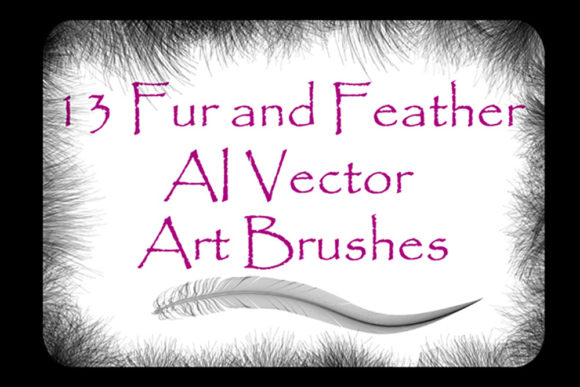
The archive, weighing in at a compact 9.78 MB, contains 13 distinct art vector brushes. Each brush features unique bunches of fur or feathers, providing a diverse palette of textures. Whether you need the coarse bristles of a boar or the delicate down of a chick, there is a brush tailored for that specific need. Furthermore, the inclusion of a PDF help file with screenshots ensures that even beginners can get started quickly. The guide walks you through installation and basic usage, reducing the learning curve significantly.
For advanced users, the open nature of the vector files means you are not limited to the presets. You can dissect the existing brushes to understand their construction and then create your own custom variations in your specific version of Illustrator. This flexibility empowers artists to tailor the tools to their unique style, ensuring that their work remains original and distinct.
Achieving Consistency and Realism
While tools like these simplify the process, achieving a professional result requires a strategic approach. Here are some practical recommendations for maintaining consistency and quality in your work:
- Start with Base Shapes: Always define the underlying form of your animal or object before applying fur or feathers. Use solid shapes to establish the silhouette and primary color zones. This provides a roadmap for where your textures should flow.
- Follow the Anatomy: Fur and feathers grow in specific directions. Pay attention to reference images to understand the flow of hair around muscles and joints. Applying brushes in the direction of growth enhances realism and prevents the "floating texture" look.
- Layer Strategically: Build your texture in passes. Start with a darker, thicker layer for the undercoat, then add lighter, finer layers for the topcoat. Use the transparency settings to let lower layers peek through, creating natural shadows and depth.
- Vary Brush Size: Avoid using a single brush size throughout the entire illustration. Larger brushes work well for broad areas like the back or sides, while smaller, more detailed brushes are better for faces, ears, and paws. This variation adds visual interest and prevents monotony.
- Color Harmony: Even though the brushes handle translucency, ensure your base colors harmonize with the fur tones. A mismatched base can make the transparent layers look muddy or unnatural.
Empowering Creativity Through Efficiency
For entrepreneurs and small business owners, time is a critical resource. Tools that reduce production time without compromising quality are invaluable. By using Fur and Feather Illustrator Brushes, designers can cut down the hours spent manually drawing individual hairs. This efficiency allows for more time to be spent on composition, storytelling, and client communication.
Educators and hobbyists also benefit from the accessibility of these tools. The straightforward interface and included documentation make it easy to teach texture techniques to students or learn them independently. The ability to produce high-quality, realistic results early in the learning journey can be highly motivating, encouraging further exploration of digital art techniques.
Ultimately, the goal of any design tool is to remove technical barriers so that creativity can flourish. These brushes do exactly that by handling the complex mathematics of transparency and overlap, allowing the artist to focus on the artistic vision. Whether you are illustrating a whimsical children’s book character or a realistic wildlife poster, the right tools can transform a good idea into a stunning visual experience.
If you find these tools enhance your workflow and elevate your designs, consider sharing your feedback. Rating the product helps other creators discover useful resources and supports the developers in continuing to create high-quality assets for the community. Thank you for exploring the possibilities of vector texture art.