Mastering Digital Grain: A Guide to Wood Texture Brushes for Procreate
In the evolving landscape of digital illustration, the demand for authenticity has never been higher. As creators move away from the sterile perfection of vector graphics and flat design, there is a noticeable shift toward organic, tactile aesthetics. This is where specialized tools like Wood Texture Brushes become indispensable. For artists using the iPad, the integration of realistic natural elements into their workflow can transform a standard digital piece into something that feels grounded and tangible. The release of collections such as the 30 Brushes Procreate set by Infinity Art Works represents more than just a software update; it reflects a broader desire among professionals and hobbyists alike to bridge the gap between traditional media textures and modern digital efficiency.
The Rise of Organic Textures in Digital Workflows
Over the past decade, digital art tools have matured significantly. Early tablet users often struggled with the "plastic" feel of digital strokes, lacking the friction and variation found in physical charcoal, ink, or paint. Today, the expectation is different. Whether you are a graphic designer creating branding materials, an illustrator working on children’s books, or a concept artist designing environments, the ability to mimic natural surfaces is crucial. Wood, in particular, offers a complex visual language. It conveys warmth, stability, and history. Incorporating wood grain into your designs can evoke feelings of craftsmanship and eco-friendliness, which are increasingly valuable in contemporary marketing and lifestyle branding.
This trend aligns with the growing popularity of "biophilic design" principles, which seek to connect building occupants more closely to nature. In the digital realm, this translates to artworks and designs that incorporate natural patterns, earthy tones, and irregular textures. Using a dedicated set of Wood Texture Brushes allows creators to achieve this look without the time-consuming process of photographing real wood, isolating the texture, and manually blending it into their composition. Instead, the texture is applied directly through the brush stroke, offering immediate feedback and artistic control.
Why Specialized Brush Sets Matter
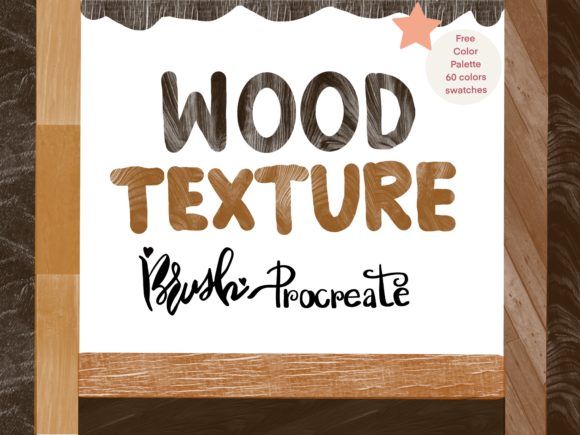
While Procreate comes with a robust library of default brushes, they are designed to be generalists. A standard round brush can simulate many things, but it rarely captures the specific irregularity of oak, pine, or reclaimed timber. This is why curated collections, such as the Hello This collection contains 30 Wood Texture Brushes Procreate, are gaining traction among serious creators. These brushes are engineered to replicate the unique characteristics of wood grain, including knots, rings, and fiber directions.
The value of such a set lies in its specificity. When a designer needs to create a rustic logo background or an illustrator needs to render a wooden table in a scene, having thirty distinct variations means they can find the exact match for their lighting and perspective needs. This reduces the reliance on external stock photos, which can often look disjointed when layered over digital paintings. By painting the texture directly, the artist maintains full control over opacity, flow, and color integration, resulting in a more cohesive final image.
Enhancing Your Palette: The Role of Color
Texture is only half the equation; color is the other. Wood is not simply brown. It ranges from the pale, creamy hues of birch to the deep, reddish tones of mahogany and the weathered grays of driftwood. To support the versatility of the brushes, many premium sets now include complementary color resources. For instance, the inclusion of a Free procreate color palette with 60 colors provides a significant advantage. This curated selection likely spans the spectrum of natural wood tones, allowing users to jumpstart their projects without spending hours mixing shades.
Having a pre-configured palette ensures color harmony. When you are working quickly, perhaps on a client deadline, the ability to select a historically accurate or aesthetically pleasing wood tone with a single tap streamlines the creative process. It also serves as an educational tool for less experienced artists, helping them understand the subtle variations in hue and saturation that make natural materials look realistic. The combination of 30 Wood Texture Brushes and a comprehensive free procreate color palette creates a complete ecosystem for creating organic digital art.
Practical Applications for Creators and Businesses
The utility of these tools extends beyond fine art. Consider the practical implications for various professional sectors:
- Branding and Packaging Design: Eco-conscious brands often use wood textures to signal sustainability. Using these brushes allows designers to create custom packaging mockups that look authentic and high-end.
- Interior Design Visualization: Freelancers and architects can use these brushes to quickly sketch out furniture concepts or flooring ideas, providing clients with a realistic sense of materiality before production.
- Social Media Content: Bloggers and influencers can create engaging backgrounds for quotes or product showcases that stand out against the typical clean, white aesthetics of social feeds.
- Educational Materials: Educators creating digital worksheets or presentations can use wood textures to create warm, inviting learning environments that feel less corporate and more approachable.
For entrepreneurs and small business owners, the ability to produce high-quality, textured graphics in-house reduces dependency on expensive stock photography subscriptions. It empowers them to maintain a consistent visual identity that feels handcrafted and personal.
Getting Started: Installation and Compatibility
Integrating new tools into your workflow should be seamless. For those purchasing the Infinity Art works collection, the process is straightforward. Understanding the technical requirements ensures a smooth experience from the moment of purchase.
How to use:
- Receive Your Files: After the purchase payment confirmation, you will receive an email with the download link. Ensure you check your spam folder if the email does not appear immediately.
- Download the Assets: Download the files to your iPad. It is often helpful to save them to the "Files" app for easy access.
- Import into Procreate: Open the Procreate app. Tap on the brush library icon, then tap on the plus sign or the import option. Navigate to your downloaded file and select it. The 30 Wood Texture Brushes will now appear in your brush set, ready for use.
Compatibility Note: It is important to remember that these are digital brushes designed specifically for the Procreate ecosystem. They will only work in the Procreate App on iPad. For optimal performance, use an iPad Pro, a standard iPad with the Apple Pencil, or a third-party stylus that supports pressure sensitivity. Pressure sensitivity is key to unlocking the dynamic range of these textures, allowing the wood grain to vary in intensity based on how hard you press.
Maximizing the Potential of Your Brush Set
To get the most out of your 30Brushes Procreate set, experiment with layer modes. Try overlaying the wood texture on a solid color layer using "Multiply" or "Overlay" blend modes to integrate the grain with your base colors. Additionally, utilize the 60 colors from the included palette to test how different stains and finishes might look on your digital wood. Don't be afraid to combine multiple brushes from the set to create complex, multi-layered surfaces that mimic aged or treated wood.
The flexibility of digital art means you can always undo, adjust, and refine. Use this to your advantage. Test the brushes on different scales; some may work better for large background elements, while others are suited for detailed close-ups of furniture or instruments. By exploring the full range of the Wood Texture Brushes, you expand your visual vocabulary and enhance the emotional resonance of your work.
Thank you for shopping Infinity Art works. Have a nice day, and happy creating.